 AI Diff Review
AI Diff Review
AI Diff Review
Analyze your current changes or any past commit (from the VCS Log) with AI—right inside IntelliJ IDEA. Choose local-first providers like Ollama/LM Studio or cloud options (OpenAI, Claude, Gemini). Configure commit gates to catch high‑risk issues before merge.
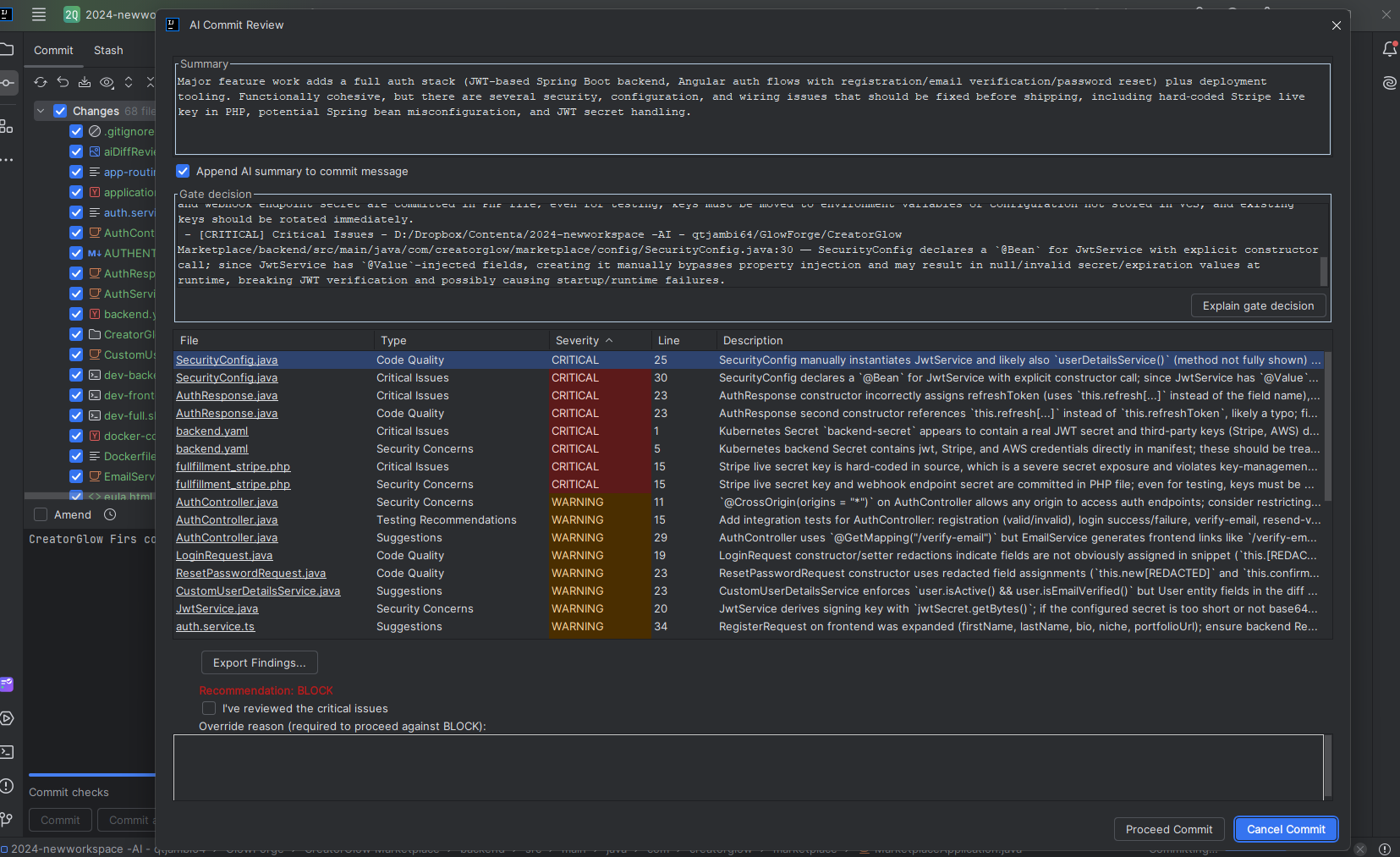
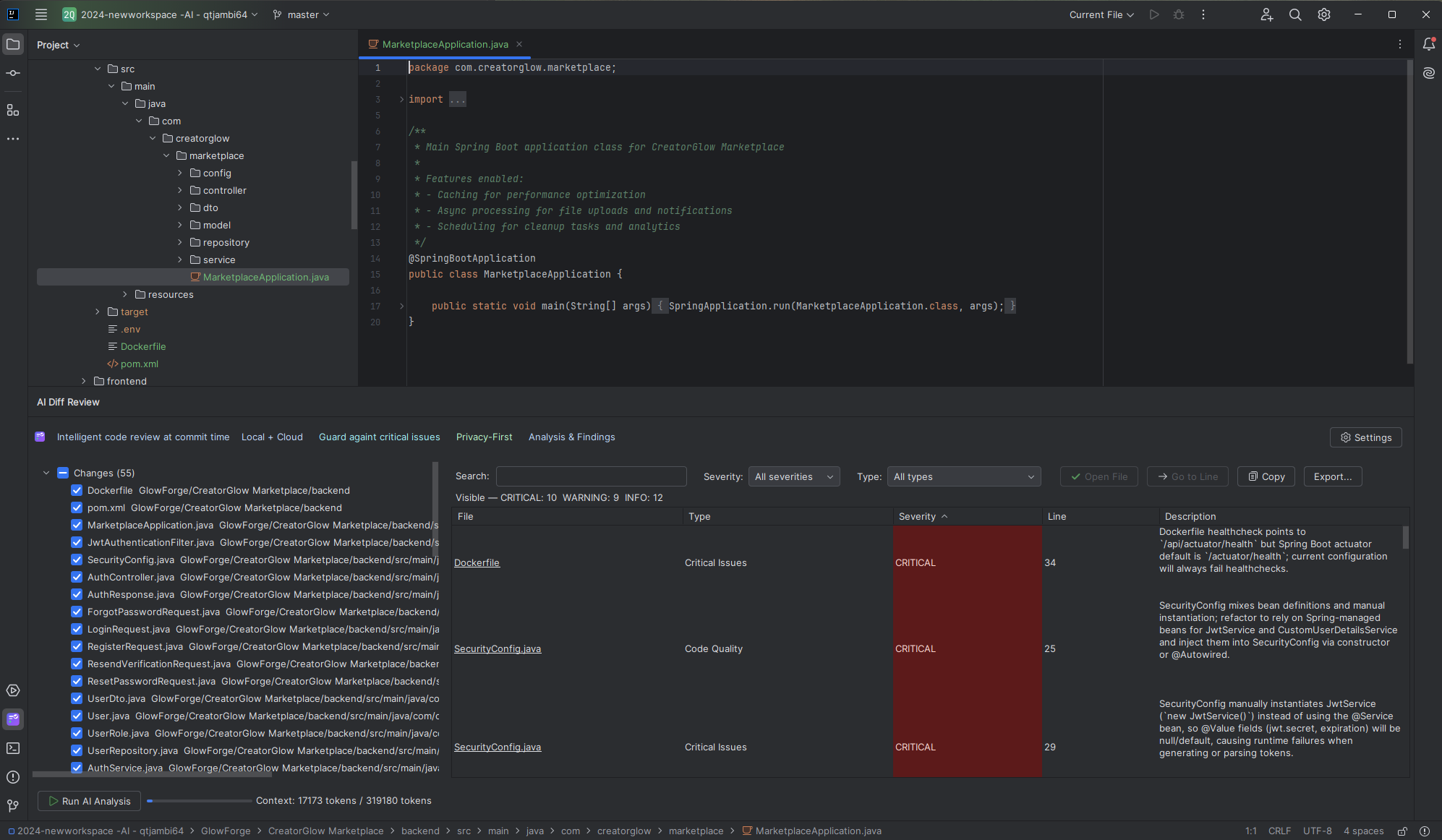
Comprehensive AI analysis that integrates seamlessly into your IntelliJ IDEA workflow
Analyzes your VCS diff directly inside the IDE before commit, catching issues early in the development cycle.
Right‑click any commit in the VCS Log to analyze its changes in a dedicated dialog with sorting, filtering, search, and file navigation.
Blocks only high-risk changes (security, data loss, severe breakages) with explicit AI decision making.
Organized analysis across Code Quality, Security, Performance, Maintainability, Architecture, and Testing.
Local-first option with Ollama keeps analysis on your machine. With OpenAI, only selected code and diffs are sent via your API key. Built-in secret redaction protects sensitive data.
Free local tier: pick an installed model (e.g., llama3) and run analysis without sending code to the cloud.
Understands diffs and full-file content with intelligent handling of large changesets and size management.
Multiple entry points (Tools menu, editor/project menus, VCS Log) with detailed results in a tool window or commit dialog.
JetBrains Marketplace handles billing, trials, and license management—no custom keys or seat juggling required.
Automatically starts after install with the full product experience.
Upgrade seamlessly when the trial ends—no reconfiguration needed.
Special pricing for students, educators, open source projects, and non-profit organizations
Free licenses for students and educators
Free licenses for classroom use
Free licenses for qualifying open source projects
Free licenses for recognized developers
50% discount for educational institutions
50% discount for qualifying startups
50% discount for non-profit organizations
40% discount for former student license holders
Simple installation and configuration process
Download from JetBrains Marketplace or install via IntelliJ IDEA's plugin manager
File → Settings → Plugins → Browse repositories → "AI Diff Review"
Select Ollama (local) to run fully on-device and pick a model, or choose OpenAI (cloud) and enter your API key.
Settings → Tools → AI Diff Review → Provider, Model/API Key
Use Tools → AI Diff Review, right‑click in the editor/project, or right‑click a commit in the VCS Log
Tools → AI Diff Review · VCS Log → Right‑click commit → AI Diff Review This Commit
Mix local-first analysis with cloud horsepower. The README and build notes capture every provider, timeout, and model pairing.
Keep code on your machine while running cutting-edge models.
Use managed APIs with explicit model choices per README/requirements.
Settings → Tools → AI Diff Review centralizes every toggle.
Pulled straight from the README and release build—use this checklist for procurement, security, and CI sign-off.
Explore tutorials, best practices, and insights about AI-powered code review and development workflows.