Two Cards for beginners: your first hands, step by step
Your first hand of Two Cards is easy to start. Pick a save slot, tap Play and follow the short tips on the table. This page walks you through it, so you know what every card, word and button means.
Step 1: Open the game and pick a save slot
The game starts with a short Contenta intro and the game's own intro. You can tap Skip. Then you see the save slots: Save 1, Save 2 and Save 3. Each one keeps its own table and its own numbers, so brothers, sisters and grown-ups can each have one.
Pick an empty slot and choose New game. Next time, pick the same slot and choose Continue. Your slot shows how many hands you have played.
Step 2: The title screen
Now you see the title screen with the menu:
| Button | What it does |
|---|---|
| Back to the table | Goes back to the table you left. It only shows when you have one. |
| Play | Deals a new table. |
| New table | Choose the players, their habits and their skill. |
| Play until one stack | A longer game: play until one player has all the chips. |
| Pass the phone | Play with family or friends on one device. |
| Which hand wins | The list of hands, best to worst. |
| Try a hand | Pick up to seven cards and see the best five. |
| Your numbers | How many hands you have played and won. |
| Settings | Speed, helpers, sound, graphics and language. |
| Save slots | Back to the three save slots. |
For your very first game, tap Play. The modes are explained on game modes.
Step 3: Look at the table
On a phone or tablet, hold it sideways now. If you hold it upright, the game shows "Turn your phone sideways" and waits for you.
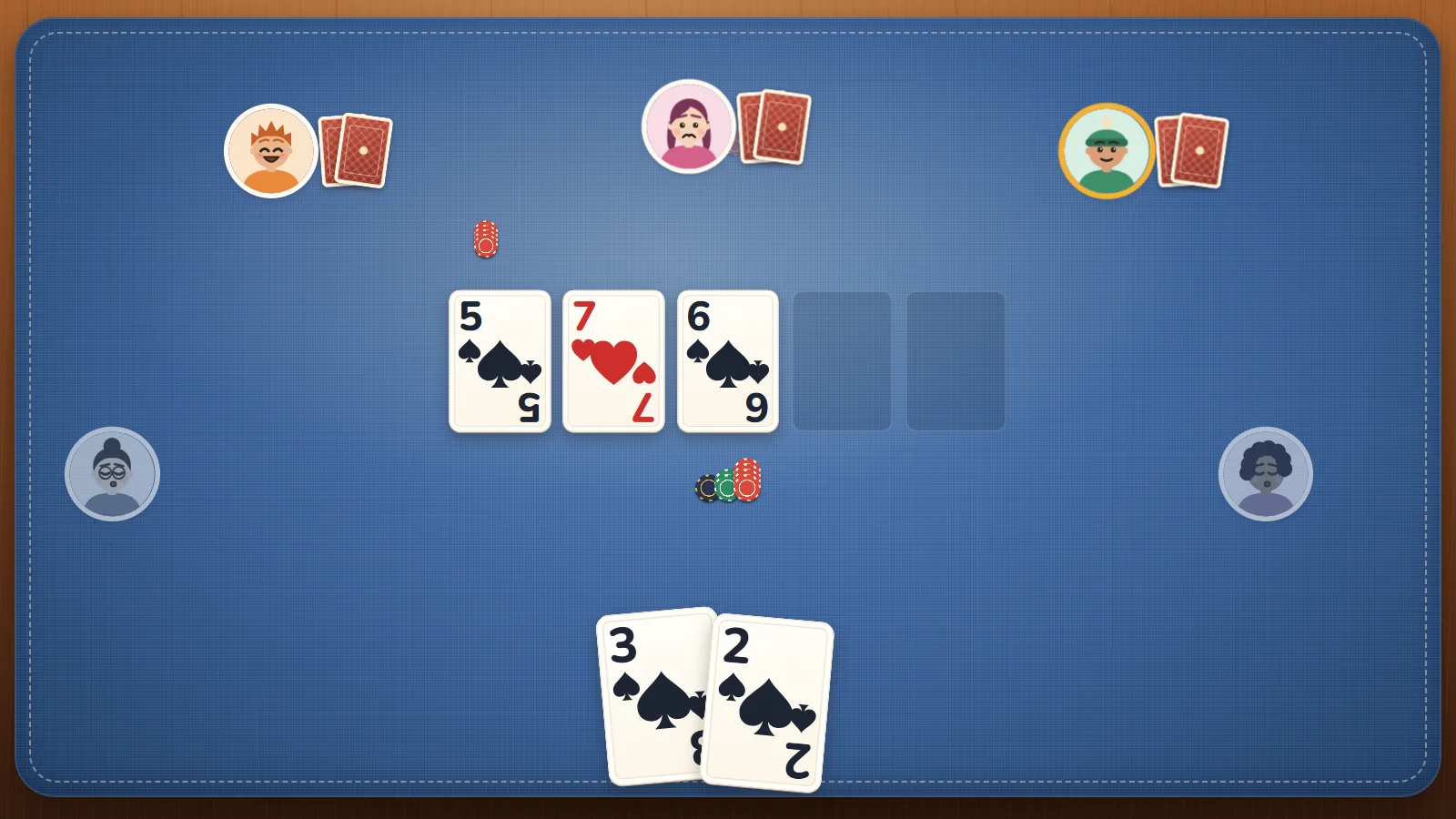
- Your two cards are at the bottom. Only you can see them.
- The five spaces in the middle are for the shared cards. They are empty at the start.
- The other players sit around the table. Under each face you see their name and their chips.
- The D marker sits next to the player who "Deals this hand". In your first hand, that is you.
- The line at the bottom of the table says "First bets 10 / 20".
- The panel on the right shows whose turn it is, the last moves and your buttons.
Everyone starts with 1,000 chips. Meet the players on the computer players.
Step 4: Your first turn
The two players after the D marker put in the first bets: 10 and 20 chips. Then everyone gets two cards. If Tips for new players is on (it is on at the start), a tip says: "These two cards are yours. Only you can see them."
The others take their turns. Their faces change, and a word under each one shows what they did, like Called or Folded. When it is your turn, the panel shows your buttons:
| Button | When you see it | What it does |
|---|---|---|
| Call with a number, like Call 20 | Someone put in more chips than you | You match them and stay in. |
| Check | Nobody put in more than you | You stay in for free. |
| Raise | You have chips to put in more | You put in more. The others must match you, or fold. |
| All in | You have chips left | You put in all your chips. |
| Fold | Always | You sit out the rest of this hand. |
A tip says: "Your turn! Call matches the bet, so you stay in. Fold means you sit out this hand." For a first try, tap Call. There is no clock, so take your time.
Step 5: Three cards, then a fourth, then a fifth
Three cards land in the middle. The tip says they belong to everyone: mix them with your two. Look under your cards. With Name my hand on, the game says what you have right now, like "You have Pair of sevens", and the cards that make it light up.
Now there is a new round of turns. If nobody has put in chips yet, you can Check. Then a fourth card comes, another round, and the fifth card, and a last round. The panel tells you what is going on, like "Mira is choosing." or "The next cards are coming."
Step 6: Who wins?
When the last turn is done, everyone still in turns their cards over. The best five cards, from each player's two plus the five in the middle, win the chips. The winning cards light up, and a sentence names the winner, like "Leo wins. Pair of tens." If you won, a "+" number shows how many chips you got.
If everyone else folds before that, the last player takes the chips without showing any cards: "Mira takes the chips."
If you lost a showdown, a small line tells you why, like "That beats your hand: Pair of fives." That means the winner had something better than your pair of fives.
Tap the sentence, or Next hand, to play on. The D marker moves one seat, and a new hand starts.
Step 7: Take a break
Tap Menu (or press Esc) to go to the title screen. The others wait for you. Tap Back to the table to sit down again. The game saves after every hand, so you can close it and come back later.
Tip: Play always deals a brand-new table. To carry on with your chips, use Back to the table.
Good to know in your first games
- Your first hands are kind to new players. While the tips are on and you have not won yet, the first three hands of a table are dealt so that your cards end up the best if you stay in to the end.
- Folding is fine. You only lose the chips you already put in.
- If you run out of chips in Play, you sit back in with 1,000 chips at the next hand.
See also
- How to play Texas Hold'em: the full rules of a hand.
- Poker hands, best to worst: which hand wins.
- Tips for new players: good first habits.
- Controls: every key and button.
- Ready? Play Poker Texas Hold'em: Two Cards.


