Gammalt, suddigt material — återställt till knivskarpt HD & 4K
Skala upp, brusreducera, stabilisera och skärp dina videor i batch på din egen GPU — ett skrivbordsalternativ till Topaz Video AI. Engångsköp, ingen $299/year-prenumeration.

Alla Format Du Behöver
Förbättra MP4, MKV, AVI, MOV, WebM, WMV, FLV, M4V och 20+ fler videoformat. Exportera i H.264, H.265, AV1 eller VP9 med GPU-accelererad kodning.
AI-Driven Video Förbättring
NVIDIA RTX VSR-uppskalning och RIFE-bildinterpolering, plus filter för brusreducering, stabilisering, deinterlacing och skärpning. Allt körs på din egen PC, utan krediter.
AI Upskalning (2x–4x)
Upscale 720p till 4K eller 1080p till 8K samtidigt som skärpa och detaljer bevaras. Drivet av NVIDIA RTX VSR videomodeller optimerade för verkligt material, animation och arkivinnehåll.
Highlight-reel remix
Förvandla en lång video till en kort highlight-reel — vertikalt 9:16 för Shorts om du vill. Scen- och ljuddetektering föreslår klippen, du finjusterar med bildförhandsvisningar, lägger till bakgrundsmusik och exporterar en ren MP4 — utan tidslinjeredigering.
Brusreducering
Ta bort korn, brus och komprimeringsartefakter från gamla hemvideor, hög-ISO-material, övervakningsinspelningar och kraftigt komprimerade filer. Välj hqdn3d för snabbhet eller nlmeans för att hålla kanterna skarpare.
AI Bildinterpolering
Nå jämna 30 eller 60 fps från valfri källa med AI-genererade mellanbilder: 24- eller 30fps-material spelas upp i 60 fps. GPU-accelererad RIFE, utan oskärpa och ghosting från frame blending.
Stabilisering
Ta bort kameraskakningar och jitter från handhållet material, actionkameror och drönvideo med vidstab-stabilisering i två pass — Lätt, Medel eller Stark. Bearbeta hela mappar med skakiga klipp i batch.
Batchbearbetning
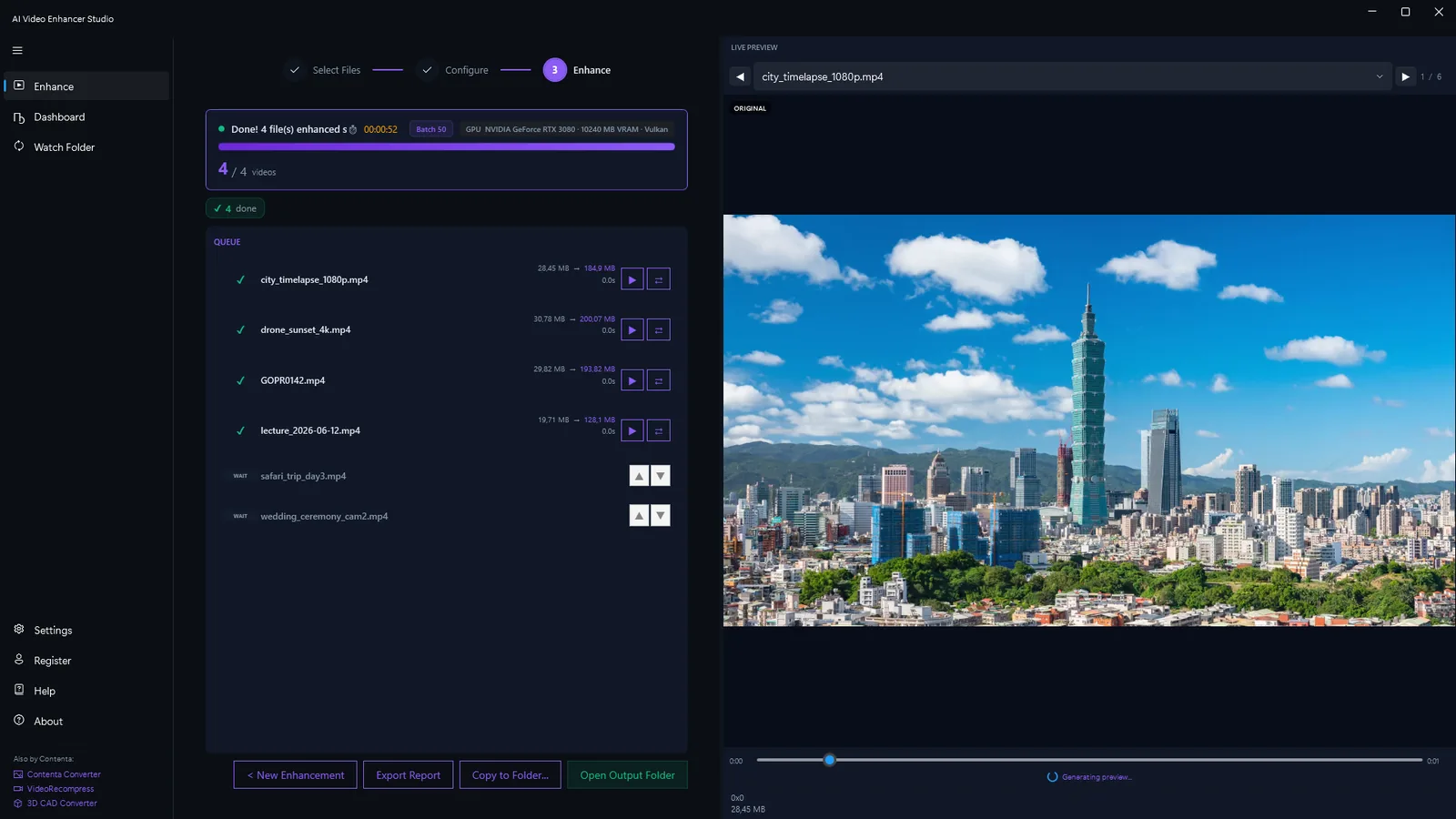
Förbättra hundratals videofiler i en enda batch. Kedja brusreducering, uppskalning och bildinterpolering i en enda pipeline. Multi-fil kö med framstegsövervakning.
GPU-Accelerering
AI-uppskalning anvander NVIDIA RTX Video Super Resolution och kraver en NVIDIA RTX GPU (20-serien eller nyare). Alla andra filter - brusreducering, skarpa, stabilisering, avflatning - samt NVENC/AMF/QSV-hardvarukodning fungerar pa vilken modern Windows-PC som helst.
Ljudrensning
Brusreducering av bakgrundsljud med ett klick tar bort vasande, brum och omgivningsljud i videons ljud. Aterstall klart och behagligt ljud utan att spela in pa nytt eller anvanda externa redigeringsverktyg.
Automatisk analys & foerslag
Slaepp in ett klipp saa granskar appen upploesning, codec, bildfrekvens och brus och rekommenderar automatiskt baesta foerinstaellning och installningar. Inget gissande - boerja foerbaettra med ett klick.
Live-foerhandsvisning & fore/efter-jaemfoerelse
Foerhandsgranska det uppskalade resultatet paa en exempelbildruta innan du bekraeftar och anvaend fore/efter-reglaget foer att se skillnaden. Se exakt vad du faar innan hela filen bearbetas.
Trimma innan du foerbaettrar
Klipp ditt klipp till exakt den del du behoever innan du foerbaettrar. Hoppa oever oeverflodigt material och spara GPU-tid - bara den del du behaaller bearbetas.
Extrahera bildrutor
Extrahera bildrutor i batch ur en video eller en hel mapp som PNG, JPG eller WebP — smarta förval (storyboard, miniatyrer, social-paket, en per scen), exakta tidsstämplar, skärpeval och valfri NVIDIA VSR AI-uppskalning av varje bildruta.
Mer än en enhancer: Remix och Extrahera bildrutor
Två produktionsverktyg ingår i varje exemplar — även i den kostnadsfria testversionen — och förvandlar material du redan har till innehåll du faktiskt kan använda.
Highlight-reel remix
Två timmar långa spelsessioner, hela ceremonier, hela matcher — ögonblicken som är värda att dela ryms i trettio sekunder. Remix tar dig dit i fyra guidade steg: avgränsa delen som ska analyseras, granska de föreslagna klippen, förhandsgranska resultatet och exportera en ren MP4.

- Scen- och ljuddetektering hittar ögonblicken — varje scenbyte och varje ljudtopp (ett mål, ett jubel, en explosion) poängsätts, och de starkaste ögonblicken blir föreslagna klipp — även i material med fast kamera.
- Du behåller kontrollen — lägg till, ta bort och justera varje klipp med bildminiatyrer i realtid; välj mållängd så slutar filmen på en stilla bild, inte en hård klippning.
- Gjord för Shorts och Reels — exportera vertikalt 9:16 eller kvadratiskt 1:1 med ett klick, lägg till bakgrundsmusik med automatisk ducking och skicka reelen direkt vidare till AI-förbättraren.
- Privat och skriptbart — allt körs på din dator, inget laddas upp, och samma motor finns i CLI:t (
remix suggest/remix render) för batchjobb.
Extrahera bildrutor
Miniatyrer till YouTube, ett storyboard till en kund, stillbilden av ögonblicket som ingen kamera fotograferade — Extrahera bildrutor plockar knivskarpa PNG-bilder ur dina videor, exakt där du vill ha dem.

- Smarta samplingsförval — Storyboard (jämnt fördelade), Miniatyrer (fem nyckelpunkter), Social (extra bildrutor mot slutet), Scener (en bildruta per upptäckt scenbyte), eller egna antal, intervall och exakta tidsstämplar.
- Hela mappar på en gång — köa hundratals videor; varje video får en egen undermapp med numrerade stillbilder — PNG, JPG eller WebP med kvalitetsreglage — upp till 1 000 bildrutor per video.
- AI-uppskalade stillbilder — förbättra valfritt varje extraherad bildruta med NVIDIA Video Super Resolution (2x–4x), med automatisk 2x för källor med låg upplösning.
- Alltid den skarpa bildrutan — det valfria skärpevalet jämför fem närliggande bildrutor och behåller den skarpaste; samma motor driver appen och
aivideoenhancer extract-framesför automatisering.
Se det i praktiken
Den riktiga appen, från inställning till klar batch — inga mockuper.

Inbyggda Arbetsflöden för Varje Användningsfall
Förkonfigurerade pipelines anpassade för specifika videotyper och branscher.
Återställning av Gamla Videor
Återställ VHS-kassetter, Hi8, MiniDV och gamla hemvideor. Brusreducering (hqdn3d eller nlmeans) tar bort analogt brus, uppskalning skärper mjukt material, och RIFE-bildinterpolering jämnar ut hackig uppspelning.
Övervakningsförbättring
Förbättra lågupplöst säkerhetskamerainspelningar. AI-upscaling avslöjar detaljer i ansikten, registreringsskyltar och objekt. Ta bort brus från nattseende- och svagt ljus-inspelningar.
Innehållsskapande
Upscale och förbättra YouTube-, TikTok- och sociala medievideor. Konvertera 1080p till 4K för professionell kvalitet. Ta bort komprimeringsartefakter från omkodat innehåll.
Dron- & Actionkamera
Stabilisera skakiga dronfilmer och GoPro-klipp. Ta bort brus från hög-ISO svagt ljus-bilder. Upscale till 4K för filmisk kvalitet från kompakta kameror.
Animation & Anime
Upscale anime och animerat innehåll med modeller som är specifikt tränade för ritad konst. Rensa linjekonst, bevara platta färger och eliminera komprimeringsbanding.
Videoarkivering
Förbered videoarkiv för långsiktig lagring. Upscale, ta bort brus och omkoda till moderna codecs (H.265, AV1) för maximal kvalitet med minimal filstorlek.
Foerbaettra (utan uppskalning)
Rensa bort komprimeringsartefakter och goer materialet skarpare utan att aendra upploesningen. Perfekt naar kaellan redan aer HD och du bara vill ha den skarpare och renare.
Mjuk roerelse (30fps)
Interpolera material till en hoegre bildfrekvens med RIFE foer mjuk, ryckfri roerelse. Goer 30fps till mjuka 60fps utan att roera upploesningen.
Hur AI Video Enhancer Studio Jämförs
Se hur vi står oss mot Topaz Video AI, HitPaw och AVCLabs.
| Feature | Topaz Video AI ($299/år) | HitPaw ($350 livstid) | AVCLabs ($300 livstid) | AI Video Enhancer |
|---|---|---|---|---|
| Upskalning (2x–4x) | ✔ | ✔ | ✔ | ✔ |
| Brusreducering | ✔ | Limited | Limited | ✔ |
| Bildinterpolation | ✔ | ✘ | ✔ | ✔ |
| Stabilization | ✔ | ✘ | ✘ | ✔ |
| Batchbearbetning | Limited | ✔ | ✔ | ✔ |
| HW-kodning (NVENC) | ✘ | ✘ | ✘ | ✔ |
| Körs på din egen dator | ✔ | ✔ | ✔ | ✔ |
| GPU-acceleration | ✔ | ✔ | ✔ | ✔ |
| Highlight-reel remix (scen- + ljud-AI, 9:16-export) | ✘ | ✘ | ✘ | ✔ |
| Bildruteextrahering (förval + AI-uppskalning) | Limited | ✘ | ✘ | ✔ |
| Cost | $299/yr | $350 | $300 | One-time |
Hur Det Fungerar
Lägg till Dina Videor
Dra video filer eller hela mappar. AI Video Enhancer Studio läser MP4, MKV, AVI, MOV, WebM och 20+ fler format.
Välj Förbättring
Välj uppskalning, brusreducering, bildinterpolering eller stabilisering, eller kombinera flera. Välj ett förinställt arbetsflöde eller konfigurera ditt eget.
Enhance
Tryck på Start. GPU-accelererad AI bearbetar dina videor lokalt. NVENC hårdvaruencoding för snabb utdata.
CLI & MCP-server
Automatisera AI-videoförbättring från skript, CI/CD-pipelines eller AI-agenter. CLI och MCP-server ingår i varje licens.
CLI-kommandon
| Kommando | Beskrivning |
|---|---|
aivideoenhancer enhance | Förbättra en video med brusreducering, stabilisering, NVIDIA RTX VSR-uppskalning och RIFE-bildinterpolering |
aivideoenhancer analyze | Analysera en videofil — upplösning, codec, längd, bitrate, bedömning av brusnivå |
aivideoenhancer presets | Lista alla 6 inbyggda förbättringsförinställningar med deras AI-pipeline-konfiguration |
aivideoenhancer status | Kontrollera licens, GPU-tillgänglighet och AI-modellstatus |
aivideoenhancer serve | Starta MCP-servern för AI-agentintegration (stdio-transport) |
aivideoenhancer remix | Föreslå och rendera highlight-reel-remixer — klipp, format, musik, ljudviktning |
aivideoenhancer extract-frames | Extraherar stillbilder från en video eller mapp efter förinställning, antal eller tidsstämpel, med valfri AI-uppskalning |
# AI-uppskalning till 4x med GPU-acceleration
aivideoenhancer enhance video.mp4 --upscale 4x --gpu auto

# Brusreducera och stabilisera gamla filmklipp
aivideoenhancer enhance old_tape.mp4 --denoise strong --stabilize

# Tillämpa en inbyggd förinställning
aivideoenhancer enhance clip.mp4 --preset old_video_restoration

# Bildinterpolation till 60fps
aivideoenhancer enhance video.mp4 --interpolate 60fps --json

# Analysera en videofil
aivideoenhancer analyze video.mp4 --json

# Extrahera 10 jämnt fördelade bildrutor, AI-uppskalade 2x
aivideoenhancer extract-frames video.mp4 --output frames/ --count 10 --upscale x2

# Extrahera en storyboard-förinställning från varje video i en mapp
aivideoenhancer extract-frames videos/ --output frames/ --preset storyboard
MCP Server — AI-agentintegration
Kör aivideoenhancer serve för att starta en Model Context Protocol-server. AI-agenter som Claude kan sedan analysera, förbättra och bearbeta videor via naturligt språk.
| MCP-verktyg | Beskrivning |
|---|---|
analyze_video | Analysera en video — upplösning, codec, längd, bitrate, brusnivå och förbättringsförslag |
enhance_video | Förbättra en video med brusreducering, stabilisering, NVIDIA RTX VSR-uppskalning och RIFE-interpoleringsalternativ |
list_presets | Lista alla 6 inbyggda förinställningar med AI-modell- och pipeline-detaljer |
get_status | Kontrollera GPU-tillgänglighet, AI-modellstatus och licensinformation |
// claude_desktop_config.json
{
  "mcpServers": {
    "aivideoenhancer": {
      "command": "aivideoenhancer",
      "args": ["serve"]
    }
  }
}
Claude Code Agent-färdigheter
Installera videoförbättrings-skill:en så att Claude Code kan använda din CLI direkt. Beskriv vad du vill — Claude känner till alla AI-modeller, förinställningar och förbättringsalternativ.
# Installera skill:en
claude skill install github:brunojanvier77/ContentaSoft/skills/contenta-video-enhancer
När den är installerad, be Claude: "Skala upp alla videor i D:\Old_Tapes till 4K och ta bort brus"
Vad användare säger
Återställde min pappas bröllops-VHS till 1080p. Frame interpolation fick gamla hemvideor att se ut som om de filmades igår.
Anime-uppskalning konkurrerar med Topaz till halva priset. Engångsköp istället för en prenumeration på $299/år avgjorde det för mig.
Rensade 200 timmar drönarfilm över natten på min RTX 4070. Batchläge fungerar faktiskt på konsumenthårdvara.
Vanliga Frågor
Ja. AI Video Enhancer Studio erbjuder samma AI-uppskalning, brusreducering och bildinterpolering — som ett engångsköp istället för Topazs $299/år prenumeration. Dessutom inkluderar det stabilisering och batchbearbetning.
NVIDIA RTX VSR för uppskalning och RIFE för bildinterpolering. Resten är FFmpeg-filter: hqdn3d eller nlmeans för brusreducering, vidstab i två pass för stabilisering, yadif eller bwdif för deinterlacing, unsharp mask eller CAS för skärpning. Allt körs lokalt på din maskin.
Ja. Upskala 720p till 1440p (2x), 720p till 4K (4x) eller 1080p till 4K (2x). Flera AI-modeller optimerade för verkligt material, animation och arkivinnehåll.
AI Video Enhancer Studio kommer att vara ett engångsköp — ingen prenumeration. Anmäl dig för att bli meddelad om prissättning och tidiga rabatter när vi lanserar.
På din egen dator, av dess processor och grafikkort. Uppskalningen körs på ditt NVIDIA RTX-kort med RTX Video Super Resolution. Programmet skickar anonym installations-, krasch- och användningsstatistik samt licenskontroller, enligt integritetspolicyn.
Ja. Arbetsflödet för återställning av gamla videor kombinerar brusreducering (hqdn3d eller nlmeans tar bort analogt brus och bandartefakter), uppskalning (skärper mjukt SD-material till HD) och RIFE-bildinterpolering (slätar ut hackig 24fps-uppspelning).
AI-uppskalning anvander NVIDIA RTX Video Super Resolution och kraver darfor en NVIDIA RTX GPU (20-serien eller nyare) med en aktuell drivrutin - det finns ingen CPU-, AMD- eller Intel-reserv for uppskalning. Alla andra forbattringar (brusreducering, skarpa, stabilisering, avflatning) och hardvarukodning fungerar pa vilken modern Windows-PC som helst.
H.264, H.265 (HEVC), AV1, and VP9. Hardware-accelerated encoding via NVENC (NVIDIA), AMF (AMD), or QSV (Intel) for fast output. Configurable quality, bitrate, and container format.
Ja. Batchbearbeta hela mappar med videofiler och kedja flera förbättringar i en enda pipeline. Multi-fil kö med framstegsövervakning och automatisk utdataorganisation.
Börja förbättra dina videor idag
Ladda ner den gratis testversionen eller köp en licens. Inget abonnemang.