陈旧模糊的画面 — 修复为清晰的 HD 与 4K
在你自己的电脑上批量放大、降噪、防抖并锐化你的视频 — Topaz Video AI 的桌面替代方案。一次性购买,无需 $299/year 订阅。

您所需的所有格式
增强 MP4、MKV、AVI、MOV、WebM、WMV、FLV、M4V 等 20 多种视频格式。以 H.264、H.265、AV1 或 VP9 输出,支持 GPU 加速编码。
AI 驱动的视频增强
NVIDIA RTX VSR 放大与 RIFE 帧插值,另加降噪、防抖、去隔行和锐化滤镜。全部在你自己的电脑上运行,无需购买积分。
AI 放大 (2x–4x)
将 720p 放大到 4K 或 1080p 放大到 8K,同时保持清晰度和细节。由针对真实视频、动画和档案内容优化的 NVIDIA RTX VSR 视频模型提供支持。
精彩集锦混剪
把长视频变成简短的精彩集锦 — 需要的话还能输出Shorts竖版9:16。场景与音频检测推荐剪辑,您用帧预览微调、添加背景音乐,然后导出一个干净的MP4 — 无需时间线剪辑。
视频降噪
从旧家庭视频、高 ISO 画面、监控录像和高度压缩的文件中去除颗粒、噪声和压缩伪影。求速度选 hqdn3d,要保留更锐利的边缘选 nlmeans。
AI 帧插值
借助 AI 生成的中间帧,从任意源素材达到流畅的 30fps 或 60fps:24fps 或 30fps 的素材以 60fps 播放。GPU 加速的 RIFE,没有帧混合带来的模糊和拖影。
视频防抖
用 vidstab 两遍防抖去除手持、运动相机和无人机视频中的抖动,可选轻度、中度或强力。批量处理整个文件夹的抖动剪辑。
批处理
在单个批处理中增强数百个视频文件。将降噪、放大和帧插值串联在一个管道中完成。多文件队列,带进度跟踪。
GPU 加速
AI 放大使用 NVIDIA RTX Video Super Resolution,需要 NVIDIA RTX GPU(20 系列或更新)。其他所有滤镜——降噪、锐化、防抖、反交错——以及 NVENC/AMF/QSV 硬件编码可在任何现代 Windows PC 上运行。
音频清理
一键背景降噪,清除视频音频中的嘶嘶声、嗡嗡声和环境噪音。无需重新录制或使用外部编辑工具,即可恢复清晰悦耳的声音。
自动分析与建议
拖入一段视频,应用会检查其分辨率、编解码器、帧率和噪点,然后自动推荐最佳预设和设置。无需猜测——一键即可开始增强。
实时预览与前后对比
在确认前于示例帧上预览放大效果,并使用前后对比滑块查看差异。在处理整个文件之前,准确了解你将得到的结果。
增强前先裁剪
在增强之前将视频裁剪到你需要的部分。跳过多余素材、节省 GPU 时间——只处理你保留的片段。
提取帧
从单个视频或整个文件夹批量提取帧,输出PNG、JPG或WebP — 智能预设(故事板、缩略图、社交包、每场景一帧)、精确时间戳、清晰度挑选,并可为每帧启用NVIDIA VSR AI放大。
不止是增强:精彩集锦混剪与提取帧
每份拷贝(包括免费试用版)都附带这两款制作工具,把您已有的素材变成真正可用的内容。
精彩集锦混剪
两小时的游戏录像、完整的典礼、整场比赛 — 值得分享的瞬间加起来不过三十秒。混剪通过四个引导步骤带您完成:框选要分析的片段、查看推荐的剪辑、预览效果、导出一个干净的MP4。

- 场景+音频检测找出精彩瞬间 — 为每个场景切换和每个音频峰值(进球、欢呼、爆炸)打分,把最强的片段作为建议剪辑 — 即使是固定机位的素材也有效。
- 您掌握主动权 — 借助实时帧缩略图添加、删除和调整任意片段;选择目标时长,成片以稳定镜头收尾,而不是生硬切断。
- 为Shorts和Reels而生 — 一键导出竖版9:16或方形1:1,添加带自动闪避的背景音乐,再把成片直接送入AI增强器。
- 本地运行,支持脚本 — 一切都在您的电脑上运行,不上传任何内容;同一引擎也内置于CLI(
remix suggest/remix render),适合批量任务。

- 智能采样预设 — 故事板(均匀分布)、缩略图(五个关键点)、社交(结尾附近加密采样)、场景(每个检测到的场景切换一帧),或自定义数量、间隔与精确时间戳。
- 整个文件夹一次处理 — 数百个视频排队处理;每个视频都有自己的子文件夹,存放编号静帧 — PNG、JPG或WebP,可调画质 — 单个视频最多提取1,000帧。
- AI放大的静帧 — 可选用NVIDIA Video Super Resolution(2x–4x)增强每一帧,低分辨率素材可自动2x。
- 永远是最清晰的那一帧 — 可选的清晰度挑选会比较附近5帧并保留最锐利的一帧;同一引擎驱动应用和
aivideoenhancer extract-frames,便于自动化。
实际操作演示
真实的应用界面,从设置到批处理完成 — 没有效果图。

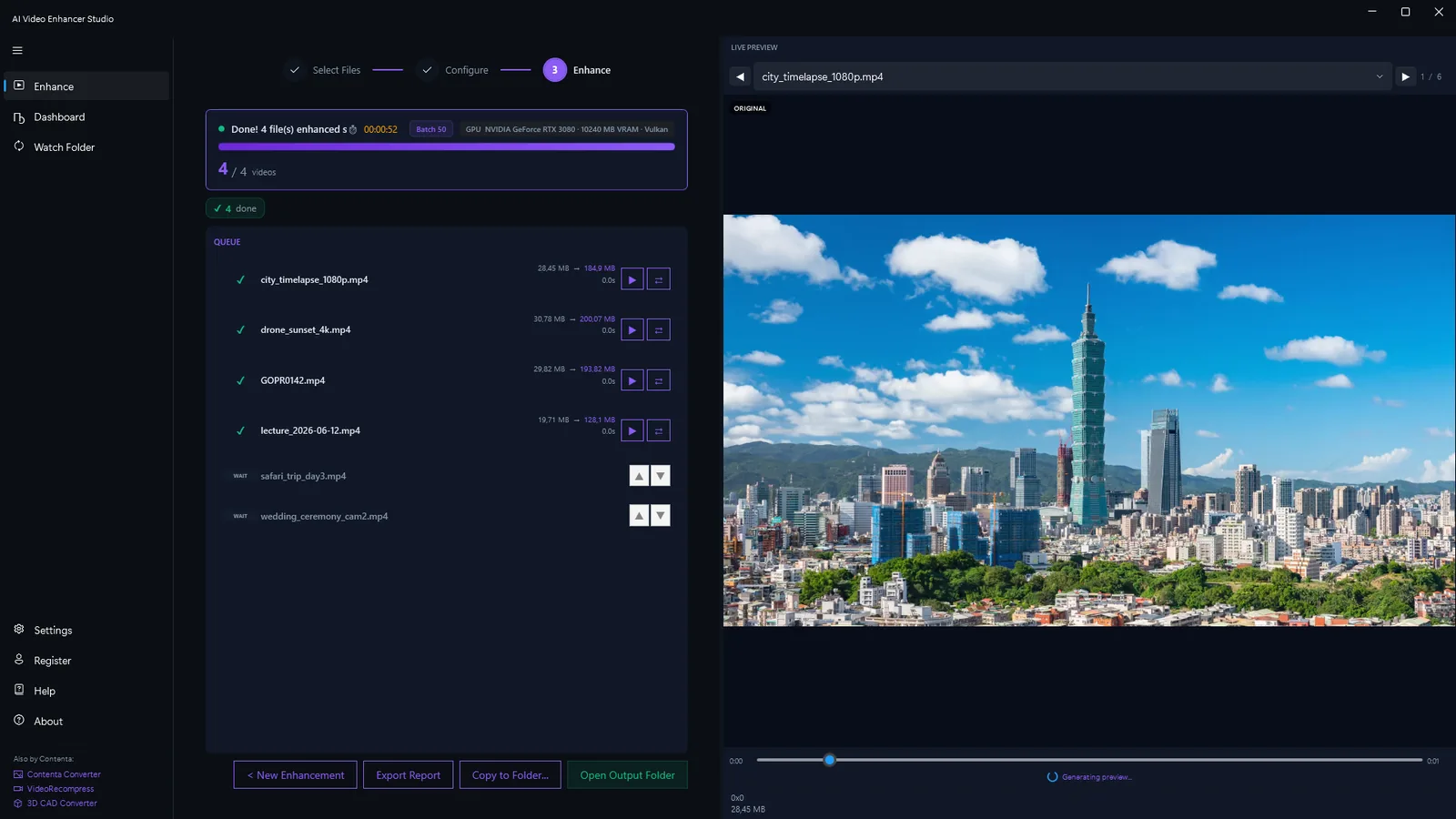
适用于每种用例的内置工作流程
针对特定视频类型和行业调优的预配置处理管道。
旧视频修复
修复 VHS 磁带、Hi8、MiniDV 和旧家庭视频。降噪(hqdn3d 或 nlmeans)去除模拟噪声,放大让柔和画面变清晰,RIFE 帧插值平滑卡顿播放。
监控增强
增强低分辨率的安全摄像头录像。AI 超分辨率技术揭示面部、车牌和物体的细节。去噪夜视和低光录制。
内容创作
提升 YouTube、TikTok 和社交媒体视频的质量。将 1080p 转换为 4K,达到专业水平。去除重新编码内容中的压缩伪影。
无人机与运动相机
稳定抖动的无人机录像和 GoPro 视频。去噪高 ISO 低光拍摄。将紧凑型相机的画面提升至 4K,达到电影级质量。
动画与动漫
使用专门为手绘艺术训练的模型提升动漫和动画内容。清晰线条艺术,保留平面颜色,消除压缩带状现象。
视频归档
为长期存储准备视频归档。提升、去噪并重新编码为现代编码格式(H.265, AV1),以实现最大质量和最小文件大小。
增强(不放大)
在不改变分辨率的情况下清除压缩瑕疵并锐化画面。当素材本身已是高清、只想让它更清晰干净时非常适合。
流畅动态(30fps)
使用 RIFE 将素材插帧到更高帧率,带来流畅无卡顿的动态。在不改变分辨率的情况下将 30fps 变为流畅的 60fps。
AI Video Enhancer Studio 的对比
看看我们与 Topaz Video AI、HitPaw 和 AVCLabs 的比较。
| Feature | Topaz Video AI($299/年) | HitPaw($350 终身) | AVCLabs($300 终身) | AI视频增强器 |
|---|---|---|---|---|
| 超分辨率(2x–4x) | ✔ | ✔ | ✔ | ✔ |
| 降噪 | ✔ | Limited | Limited | ✔ |
| 帧插值 | ✔ | ✘ | ✔ | ✔ |
| Stabilization | ✔ | ✘ | ✘ | ✔ |
| 批处理 | Limited | ✔ | ✔ | ✔ |
| 硬件编码(NVENC) | ✘ | ✘ | ✘ | ✔ |
| 在您自己的电脑上运行 | ✔ | ✔ | ✔ | ✔ |
| GPU 加速 | ✔ | ✔ | ✔ | ✔ |
| 精彩集锦混剪(场景+音频AI,9:16导出) | ✘ | ✘ | ✘ | ✔ |
| 提取帧(预设+AI放大) | Limited | ✘ | ✘ | ✔ |
| Cost | $299/yr | $350 | $300 | One-time |
工作原理
添加您的视频
拖放视频文件或整个文件夹。AI Video Enhancer Studio 支持 MP4、MKV、AVI、MOV、WebM 及 20 多种格式。
选择增强
选择放大、降噪、帧插值或防抖,也可组合多项。选择预设工作流程或配置您自己的。
Enhance
点击开始。GPU 加速的 AI 在本地处理您的视频。NVENC 硬件编码实现快速输出。
CLI & MCP 服务器
从脚本、CI/CD管道或AI代理自动执行AI视频增强。CLI和MCP服务器包含在每个许可证中。
CLI命令
| 命令 | 说明 |
|---|---|
aivideoenhancer enhance | 用降噪、防抖、NVIDIA RTX VSR 放大和 RIFE 帧插值增强视频 |
aivideoenhancer analyze | 分析视频文件 — 分辨率、编解码器、时长、比特率、噪声水平评估 |
aivideoenhancer presets | 列出所有6个内置增强预设及其AI管道配置 |
aivideoenhancer status | 检查许可证、GPU可用性和AI模型状态 |
aivideoenhancer serve | 启动用于AI代理集成的MCP服务器(stdio传输) |
aivideoenhancer remix | 建议并渲染精彩集锦混剪 — 片段、画幅、音乐、音频权重 |
aivideoenhancer extract-frames | 按预设、数量或时间戳从视频或文件夹中提取静止帧,可选择 AI 放大 |
# 使用GPU加速进行4倍AI升级
aivideoenhancer enhance video.mp4 --upscale 4x --gpu auto

# 对旧素材进行降噪和稳定处理
aivideoenhancer enhance old_tape.mp4 --denoise strong --stabilize

# 应用内置预设
aivideoenhancer enhance clip.mp4 --preset old_video_restoration

# 帧插值至60fps
aivideoenhancer enhance video.mp4 --interpolate 60fps --json

# 分析视频文件
aivideoenhancer analyze video.mp4 --json

# 提取 10 个均匀分布的帧,并以 AI 放大 2 倍
aivideoenhancer extract-frames video.mp4 --output frames/ --count 10 --upscale x2

# 从文件夹中的每个视频批量提取故事板预设
aivideoenhancer extract-frames videos/ --output frames/ --preset storyboard
MCP Server — AI代理集成
运行aivideoenhancer serve启动Model Context Protocol服务器。Claude等AI代理随后可以通过自然语言分析、增强和处理视频。
| MCP工具 | 说明 |
|---|---|
analyze_video | 分析视频 — 分辨率、编解码器、时长、比特率、噪声水平和增强建议 |
enhance_video | 用降噪、防抖、NVIDIA RTX VSR 放大和 RIFE 插值选项增强视频 |
list_presets | 列出所有6个内置预设及AI模型和管道详情 |
get_status | 检查GPU可用性、AI模型状态和许可证信息 |
// claude_desktop_config.json
{
  "mcpServers": {
    "aivideoenhancer": {
      "command": "aivideoenhancer",
      "args": ["serve"]
    }
  }
}
Claude Code Agent 技能
安装视频增强技能,让Claude Code直接使用您的CLI。描述您的需求 — Claude了解所有AI模型、预设和增强选项。
# 安装技能
claude skill install github:brunojanvier77/ContentaSoft/skills/contenta-video-enhancer
安装后,询问Claude:"将D:\Old_Tapes中的所有视频升级到4K并去除噪声"
用户评价
将我父亲的婚礼录像带恢复到1080p。帧插值让旧家庭录像看起来像是昨天拍的。
动漫升级的效果与 Topaz 相媲美,价格却只有一半。一次性购买而不是每年299美元的订阅让我决定了。
在我的 RTX 4070 上一夜清理了 200 小时的无人机镜头。批处理模式在消费级硬件上确实有效。
常见问题
是的。AI Video Enhancer Studio 提供相同的 AI 放大、去噪和帧插值 — 一次性购买,而不是 Topaz 的 $299/年订阅。此外,它还包括稳定和批处理功能。
放大使用 NVIDIA RTX VSR,帧插值使用 RIFE。其余都是 FFmpeg 滤镜:降噪用 hqdn3d 或 nlmeans,防抖用两遍 vidstab,去隔行用 yadif 或 bwdif,锐化用 unsharp mask 或 CAS。全部在您的机器上本地运行。
可以。使用 NVIDIA RTX Video Super Resolution 放大 2 倍、3 倍或 4 倍:720p 放大到 1440p(2 倍)或 4K(3 倍),1080p 放大到 4K(2 倍)。只有一个引擎,无需选择模型。
AI Video Enhancer Studio 将是一次性购买 — 无需订阅。注册以在我们发布时获得定价和早鸟折扣的通知。
在您自己的电脑上,由处理器和显卡处理。放大通过 RTX Video Super Resolution 在您的 NVIDIA RTX 显卡上运行。本软件会发送匿名的安装、崩溃和使用统计以及许可证验证,详见隐私政策。
可以。旧视频恢复工作流程结合了降噪(hqdn3d 或 nlmeans 去除模拟噪声和磁带伪影)、放大(将模糊的 SD 视频锐化为 HD)和 RIFE 帧插值(平滑 24fps 播放的卡顿)。
AI 放大使用 NVIDIA RTX Video Super Resolution,因此需要配备最新驱动的 NVIDIA RTX GPU(20 系列或更新)——放大功能没有 CPU、AMD 或 Intel 的回退方案。其他所有增强功能(降噪、锐化、防抖、反交错)和硬件编码可在任何现代 Windows PC 上运行。
H.264, H.265 (HEVC), AV1, and VP9. Hardware-accelerated encoding via NVENC (NVIDIA), AMF (AMD), or QSV (Intel) for fast output. Configurable quality, bitrate, and container format.
可以。批量处理整个文件夹的视频文件,并在单个管道中串联多项增强。多文件队列,带进度跟踪和自动输出组织。