Bring Your Family Videos Back to Life with AI
Denoise VHS grain, upscale to HD, and deinterlace — your old tapes deserve better than 480i.
One-click 'Old Video Restoration' preset. Batch process your entire tape collection. $129 one-time.
Download Free TrialFree trial: your first 5 files within 30 days at full resolution, no watermark. Then a watermark and a 720p cap until you buy. No credit card needed.
From the makers of Contenta Converter, used by 100,000+ people. · ✓ 30-day money-back guarantee · ✓ $129 one-time purchase. No subscription. Free updates.
Real output: a 1938 home movie, cleaned and upscaled 4×
 Before
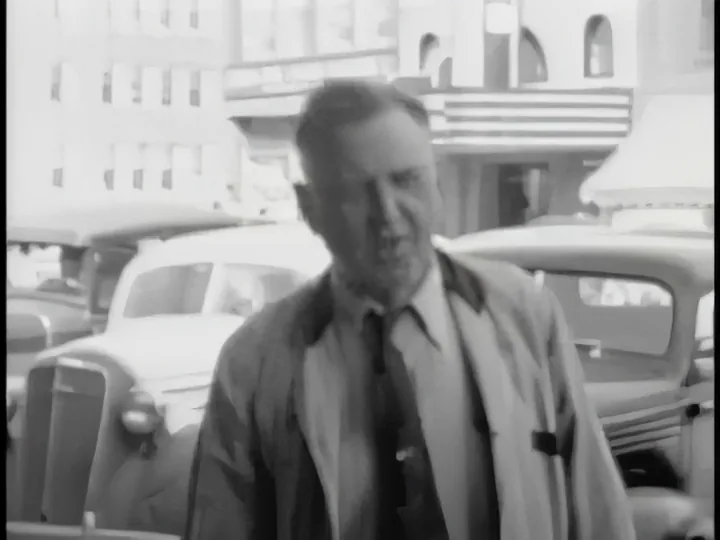 After
After
Source: Ivan Besse home movies, 1938 (Prelinger Archives, public domain), in the 320×240 copy archive.org serves. It is film, not tape: we have no VHS capture we can publish. Settings: Denoise Strong (an ffmpeg filter), Upscale 4× with NVIDIA RTX Video Super Resolution, Sharpen Light. Grain and blocks go; detail the film never held does not appear. Both images show the same frame and the same area. The source is enlarged with bicubic scaling, as a player would show it. Output from AI Video Enhancer Studio.
Key Features
hqdn3d or nlmeans denoising smooths analog grain and tape noise while keeping faces and details intact.
NVIDIA RTX VSR adds real resolution to 480i/576i footage. Your home videos on a modern TV — without the blur.
Digitized 50 tapes? Drop them all in. AI Video Enhancer processes them overnight while you sleep.
Built-In Preset
One-click preset: Stabilization Medium, Denoise Strong, Upscale 2× and audio cleanup, for VHS, Hi8, MiniDV and DVD transfers. For interlaced tapes, set Deinterlace to Yadif in Configure.
How It Works
Add Your Videos
Drag and drop files or entire folders.
Pick a Preset or Customize
Select a built-in preset or fine-tune every AI parameter.
Enhance
Click Start Enhancement. Each video is saved as a new file.
One Price. No Subscription.
Free trial: your first 5 files within 30 days at full resolution, no watermark. Then a watermark and a 720p cap until you buy. No credit card needed.
Published by ContentaSoft, Umea, Sweden — developer of AI Video Enhancer Studio.
AI Video Enhancer Studio is a desktop application for Windows that upscales video with NVIDIA RTX Video Super Resolution, interpolates frames with RIFE, and denoises, stabilizes and deinterlaces with FFmpeg filters. Encoding is GPU-accelerated.
This software contains no adware, spyware, toolbars, or bundled third-party programs. The installer installs only AI Video Enhancer Studio.
Videos are processed on your own PC, on its processor and graphics card. The software sends anonymous install, crash and usage statistics and license checks, as described in the Privacy Policy.
Free trial: your first 5 files within 30 days at full resolution without a watermark. After that, output is watermarked and capped at 720p until you enter a license key. Lifetime license: $129 (one-time payment, no subscription).
How to Uninstall
Open Windows Settings > Apps > Installed apps, find "AI Video Enhancer Studio" in the list, and click Uninstall. You can also run the uninstaller from the installation folder or use Control Panel > Programs and Features.
Download size: ~2 MB (web installer). Additional components including AI models are downloaded during installation.