AI Video Upscaler: upscale video to 4K on an RTX card
Blurry 480p, 720p and 1080p clips come out at 2×, 3× or 4× the resolution, a whole folder at a time, with NVIDIA RTX Video Super Resolution running on your own graphics card.
Upscaling needs an NVIDIA RTX graphics card, 20-series or newer. There is no AMD or Intel upscaling.Windows 10 and 11. $129 once, no subscription.
Download Free Trial Buy for $129Free trial: your first 5 files within 30 days, at full resolution and without a watermark. After that, a watermark and a 720p cap until you buy. $129 once, no subscription.
From the makers of Contenta Converter, used by 100,000+ people. · ✓ 30-day money-back guarantee · ✓ $129 one-time purchase. No subscription. Free updates.
Real output: 540p in, 1080p out
 Source 540p
 RTX VSR 2×
Source: a 6-second 960×540 H.264 copy of a licensed stock clip. Output from AI Video Enhancer Studio 2026.7.12. The source crop is enlarged with bicubic scaling, as a player would show it, so both crops appear at the same size.
AI Video Enhancer Studio vs Topaz Video AI, Video2X and Upscayl
What each one costs, which graphics card it needs, and whether it can work through a folder of videos.
| AI Video Enhancer Studio | Topaz Video AI | Video2X | Upscayl | |
|---|---|---|---|---|
| Price | $129 once | $299 a year | Free, open source | Free, open source |
| Upscales video | Yes, NVIDIA RTX VSR | Yes, own models | Yes: Real-ESRGAN, Real-CUGAN, Anime4K | No, still images only |
| Graphics card for upscaling | NVIDIA RTX, 20-series or newer | NVIDIA, AMD, Intel or Apple silicon | Any Vulkan GPU | Any Vulkan GPU |
| A folder of videos | Add Folder, Watch Folder, command line | Export queue | Queue in the desktop app | Image batches only |
| Frame interpolation | RIFE, to 30 or 60 fps | Yes | RIFE | No |
| Subscription | No | Yes | No | No |
Prices and features from topazlabs.com and the Video2X (6.4) and Upscayl GitHub pages, September 2026. With an AMD or Intel card, Topaz or Video2X are the options; with an RTX card and a folder of footage, $129 once covers it.
From low-res source to a sharp modern screen
SD → HD
480p and 576p camcorder and DVD footage at twice the lines, close to 1080p. Deinterlace tapes first.
720p → 1440p / 4K
Old web clips and phone video taken up 2× or 3×.
1080p → 4K
Full-HD footage taken to crisp 4K UHD for modern TVs and displays.
Three steps in AI Video Enhancer Studio
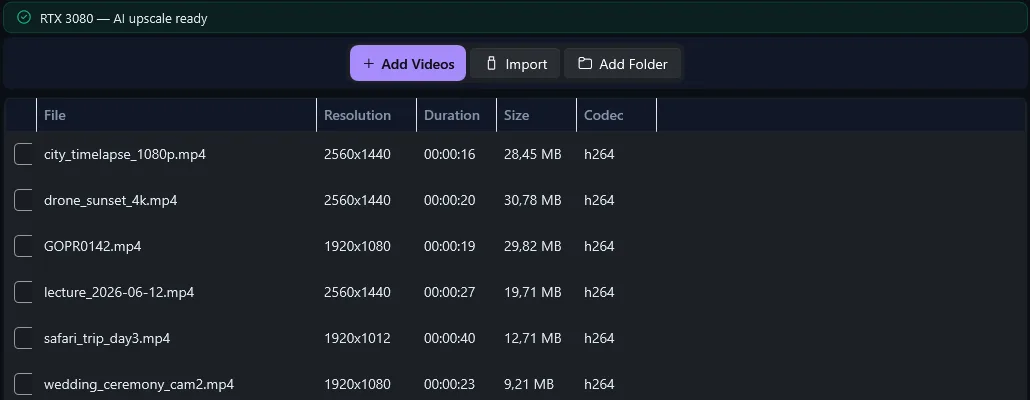
Click Add Videos or Add Folder. The list shows each file's resolution, length and codec.
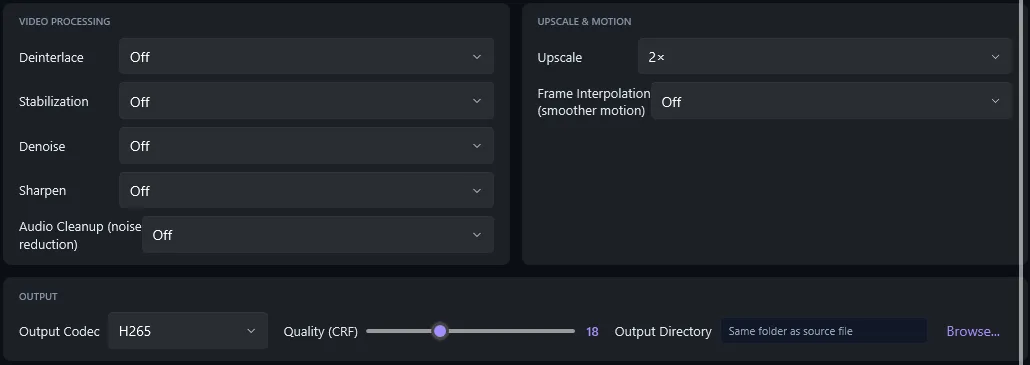
On Configure, pick the scale and the output codec. The summary shows the GPU path: NVIDIA VSR.
Click Start Enhancement. Every video gets a new file, next to the original or in the folder you chose.
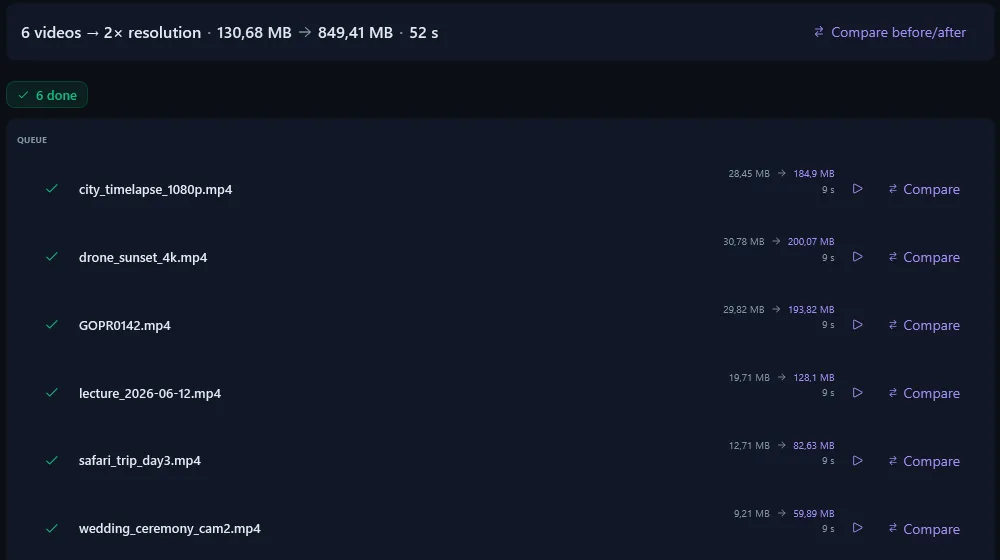
Long batches that finish
Before the first frame, the app checks that your card can produce the output resolution you picked. If it cannot, you get a clear message instead of a failed render.
If the fast VSR pipe or the hardware encoder fails on a file, the app runs that file again on a slower path instead of giving up.
The first step, Select Files, shows your graphics card and whether it can run AI upscaling, before you queue anything.
One Price. No Subscription.
Frequently asked questions
Do I need an NVIDIA RTX graphics card?
Yes, for upscaling: an NVIDIA RTX card, 20-series or newer, with a current driver. The table shows what runs on other cards.
| Graphics card | RTX VSR upscaling | Deinterlace, denoise, stabilization, RIFE |
|---|---|---|
| NVIDIA GeForce RTX 20, 30, 40 and 50 series (desktop and laptop) | ✓ Yes | ✓ Yes |
| NVIDIA GTX 16 and 10 series | ✗ No | ✓ Yes |
| AMD Radeon, Intel Arc, integrated graphics | ✗ No | ✓ Yes |
Can I upscale video to 4K?
Yes. Upscale 2× takes 1080p to 4K (3840×2160); 3× or 4× take 720p and smaller sources there. Add a folder and every file in it is upscaled in one run.
How does the AI video upscaler work?
Every frame goes through NVIDIA RTX Video Super Resolution on your graphics card. It rebuilds edges and removes compression blocks instead of stretching pixels, and the frames are encoded into a new file at 2×, 3× or 4× the resolution.
Is this a good video resolution enhancer for old or low-res footage?
Yes, within limits. It cleans up soft, compressed and old footage and sharpens edges, but it cannot invent detail the camera never recorded. For tapes, deinterlace and denoise first.
What video formats can I upscale?
Most camera, phone, disc and web formats go in; the result comes out in the codec and container you pick.
How much does the AI video upscaler cost?
$129 once, no subscription. The free trial upscales your first 5 files within 30 days at full resolution; after that, output is watermarked and capped at 720p until you buy.
Where does the upscaling run?
On your computer: the NVIDIA RTX card in your Windows PC does the work, with no per-minute fees.
Will it crash on long videos or big batches?
Before it starts, the app checks that your card can produce the output resolution. If the fast VSR pipe or the hardware encoder fails on a file, that file runs again on a slower path instead of stopping.
Related upscaling guides
Why VLC and Chrome do not save the RTX VSR upscale, and how to keep it.
Make blurry, low-resolution and compressed clips clear again.
VHS, Hi8 and MiniDV restored and upscaled to HD.
Bring old anime and animation up to 4K with clean lines.
$129 once instead of $299 a year.
Hardware, price and setup of three upscalers side by side.
Upscaling needs an NVIDIA RTX graphics card, 20-series or newer. There is no AMD or Intel upscaling.
Published by ContentaSoft, Umea, Sweden — developer of AI Video Enhancer Studio.
AI Video Enhancer Studio is a desktop application for Windows that upscales video with NVIDIA RTX Video Super Resolution, interpolates frames with RIFE, and denoises, stabilizes and deinterlaces with FFmpeg filters. Encoding is GPU-accelerated.
This software contains no adware, spyware, toolbars, or bundled third-party programs. The installer installs only AI Video Enhancer Studio.
Videos are processed on your own PC, on its processor and graphics card. The software sends anonymous install, crash and usage statistics and license checks, as described in the Privacy Policy.
Free trial: your first 5 files within 30 days at full resolution without a watermark. After that, output is watermarked and capped at 720p until you enter a license key. Lifetime license: $129 (one-time payment, no subscription).
How to Uninstall
Open Windows Settings > Apps > Installed apps, find "AI Video Enhancer Studio" in the list, and click Uninstall. You can also run the uninstaller from the installation folder or use Control Panel > Programs and Features.
Download size: ~2 MB (web installer). Additional components including AI models are downloaded during installation.