File format guide
How to convert 3MF to STL (Bambu / Prusa projects)
A 3MF from Bambu Studio or PrusaSlicer holds the model and the slicer's data. When a tool only reads STL, 3D CAD Converter takes the mesh out: every object, in millimetres, where the 3MF put it on the plate. Colours stay behind, because STL has none.
What reaches the STL
| In the 3MF | STL | OBJ |
|---|---|---|
| Every object's mesh | Yes | Yes |
| Sizes in millimetres | Yes | Yes |
| Position on the plate | Yes | Yes |
| One colour per object | No | Yes |
| Colours painted in the slicer | No | No |
| Texture colours | No | No |
| Plates, filaments, print settings | No | No |
Checked on real files with 3D CAD Converter 1.0.23. STL stores triangles only. OBJ keeps the plain colour a 3MF gives each object, as a material.
Convert 3MF to STL in four steps
- Add the 3MF filesDrag .3mf files or a whole folder into 3D CAD Converter. Bambu Studio and PrusaSlicer project files both open.
- Pick STLChoose STL as the output. A 3MF is already a mesh, so the triangles are copied as they are, with no tessellation to set.
- Keep millimetres3MF sizes are read in millimetres and the STL keeps them. Set a target unit only if the next tool expects inches.
- Start ConvertingClick Start Converting. Each 3MF becomes one STL that holds all of its objects.
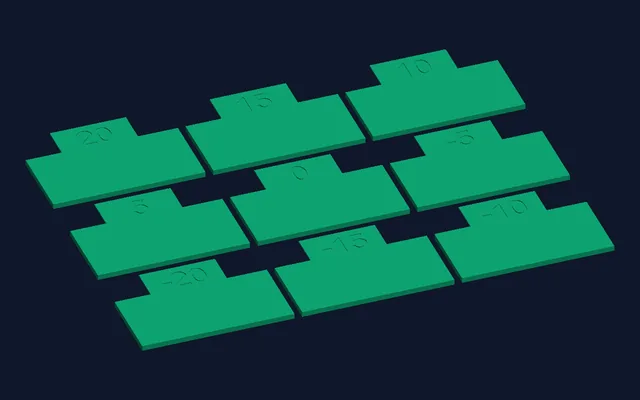
Real output, not a mock-up. Bambu Studio's flow-rate calibration file (flowrate-test-pass1.3mf, 143 KB, 9 objects) converted to STL by 3D CAD Converter 1.0.23, then rendered from the STL. 2.3 s on a Ryzen 9 3900X.
cadconvert convert -i flowrate-test-pass1.3mf -o flowrate.stl
cadconvert batch -i C:\prints\3mf -o C:\prints\stl -f stl
The same from the command line: one file, or every 3MF in a folder.
Parts stay where the 3MF puts them
3MF build item
125, 105centre of the part on the plate, x and y in mm3D CAD Converter
225,154triangles read and writtenSTL
95–155x range in mm, centred on 125A PrusaSlicer project with one 60 × 31 × 48 mm part (2.5 MB, 225,154 triangles): the STL spans x 95 to 155 and y 89.5 to 120.5 and stands on z = 0, the spot it had on the plate. 10 s on the same PC. A Bambu Studio project that keeps its objects in separate files inside the 3MF (pa_pattern.3mf) converts the same way.
What does not come across
Painted colours
Colours painted with the brush in Bambu Studio or PrusaSlicer are slicer data, not mesh colours. No output format keeps them.
Texture colours
A textured 3MF comes out without colour. For one plain colour per object, convert to OBJ instead of STL.
Plates
A project with several plates is not split. Every object goes into the one STL, each at its own position.
Print settings
Filaments, supports and slicer profiles stay in the 3MF. Keep it as your master and send the STL as a copy.
Convert your own 3MF projectsFree trial: 10 conversions, no credit card. Windows 10/11, 64-bit.
Download Free TrialQuestions
Can I convert a Bambu Studio 3MF to STL?
Yes. 3D CAD Converter 1.0.23 reads Bambu Studio project files, including the ones that keep each object in its own file inside the 3MF. All objects come out in one STL, in millimetres, at their plate positions. Painted colours are not kept.
Does the STL keep my colours?
No. STL has no colour. Convert to OBJ and each object keeps the one colour the 3MF gives it. Colours painted in the slicer and texture colours are lost in STL and OBJ alike.
Why is the STL bigger than the 3MF?
A 3MF is a ZIP archive; a binary STL is not compressed and stores each triangle's corners in full. The 143 KB Bambu plate became a 346 KB STL, the 2.5 MB PrusaSlicer project an 11.3 MB STL, with the same triangles.
Can I turn the STL back into a 3MF?
Yes. The 6,920-triangle STL above went back to a 3MF in 1.7 s, in millimetres, with the same 6,920 triangles. The colours and slicer settings of the original project do not come back.
Related: 3MF file format · STL vs OBJ vs 3MF for 3D printing · STEP to STL at four settings