Old, blurry footage — restored to crisp HD & 4K
Batch-upscale, denoise, stabilize and sharpen your videos on your own GPU — a desktop alternative to Topaz Video AI. One-time purchase, no $299/year subscription, no upload.

All the Formats You Need
Enhance MP4, MKV, AVI, MOV, WebM, WMV, FLV, M4V, and 20+ more video formats. Output in H.264, H.265, AV1, or VP9 with GPU-accelerated encoding.
AI-Powered Video Enhancement
NVIDIA RTX VSR upscaling and RIFE frame interpolation, plus denoise, stabilize, deinterlace and sharpen filters. Everything runs on your own PC — no cloud, no credits.
AI Upscaling (2x–4x)
Upscale 720p to 4K or 1080p to 8K while preserving sharpness and detail. Powered by NVIDIA RTX VSR video models optimized for real-world footage, animation, and archival content.
Highlight-Reel Remix
Turn a long video into a short highlight reel — vertical 9:16 for Shorts if you like. Scene and audio detection suggest the clips, you fine-tune with frame previews, add background music, then export one clean MP4 — no timeline editing.
Noise Reduction
Remove grain, noise and compression artifacts from old home videos, high-ISO footage, surveillance recordings and heavily compressed files. Pick hqdn3d for speed or nlmeans to keep edges sharper.
AI Frame Interpolation
Reach a smooth 30 or 60 fps from any source with AI-generated in-between frames — turn choppy 24 or 30fps into silky 60fps. GPU-accelerated RIFE with no motion blur or ghosting.
Stabilization
Remove camera shake and jitter from handheld, action-cam and drone video with two-pass vidstab stabilization in Light, Medium or Strong. Process whole folders of shaky clips in batch.
Batch Processing
Enhance hundreds of video files in a single batch. Chain denoise, upscale and frame interpolation in one pipeline. Multi-file queue with progress tracking.
GPU Acceleration
AI upscaling uses NVIDIA RTX Video Super Resolution and requires an NVIDIA RTX GPU (20-series or newer). All other filters - denoise, sharpen, stabilize, deinterlace - plus NVENC/AMF/QSV hardware encoding run on any modern Windows PC.
Audio Cleanup
One-click background-noise reduction cleans up hiss, hum, and ambient noise in your video's audio. Restore clear, listenable sound without re-recording or external editing tools.
Auto-Analyze & Suggest
Drop in a clip and the app inspects its resolution, codec, frame rate, and noise, then recommends the best preset and settings automatically. No guesswork - start enhancing in one click.
Live Preview & Before/After Compare
Preview the upscaled result on a sample frame before committing, and use the before/after compare slider to check the difference. See exactly what you'll get before processing the whole file.
Trim Before You Enhance
Cut your clip to just the part you need before enhancing. Skip the dead footage and save GPU time - only the section you keep gets processed.
Extract Frames
Batch-extract frames from one video or a whole folder as PNG, JPG or WebP — smart presets (storyboard, thumbnails, social pack, one per scene), exact timestamps, sharpness-aware picking, and optional NVIDIA VSR AI upscale applied to each frame.
More than an enhancer: Remix and Extract Frames
Two production tools included with every copy — free trial included — that turn footage you already have into content you can actually use.
Highlight-Reel Remix
Two-hour gameplay sessions, full ceremonies, entire matches — the moments worth sharing add up to thirty seconds. Remix gets you there in four guided steps: trim the part worth analyzing, review the suggested clips, preview the reel, export one clean MP4.

- Scene + audio detection find the moments — every scene change and every audio spike (a goal, a cheer, an explosion) is scored, and the strongest beats become suggested clips — even on static-camera footage.
- You stay in control — add, remove and retime any clip with live frame thumbnails; pick the target length and the reel ends on a held shot, not a hard cut.
- Made for Shorts and Reels — export vertical 9:16 or square 1:1 with one click, add background music with automatic ducking, then send the reel straight into the AI enhancer.
- Private and scriptable — everything runs on your PC, nothing is uploaded, and the same engine ships in the CLI (
remix suggest/remix render) for batch jobs.
Extract Frames
Thumbnails for YouTube, a storyboard for a client, a still of the exact moment the camera never photographed — Extract Frames pulls pin-sharp PNG images out of your videos, exactly where you want them.

- Smart sampling presets — Storyboard (evenly spaced), Thumbnails (five key points), Social (extra frames near the ending), Scenes (one frame per detected scene change), or custom counts, intervals and exact timestamps.
- Whole folders at once — queue hundreds of videos; each one gets its own tidy subfolder of numbered stills — PNG, JPG or WebP with a quality dial — up to 1,000 frames per video.
- AI-upscaled stills — optionally enhance every extracted frame with NVIDIA Video Super Resolution (2x–4x), with auto-2x for low-resolution sources.
- Always the sharp frame — optional sharpness picking compares five nearby frames and keeps the crispest; the same engine powers the app and
aivideoenhancer extract-framesfor automation.
See it in action
The real app, from setup to finished batch — no mockups.

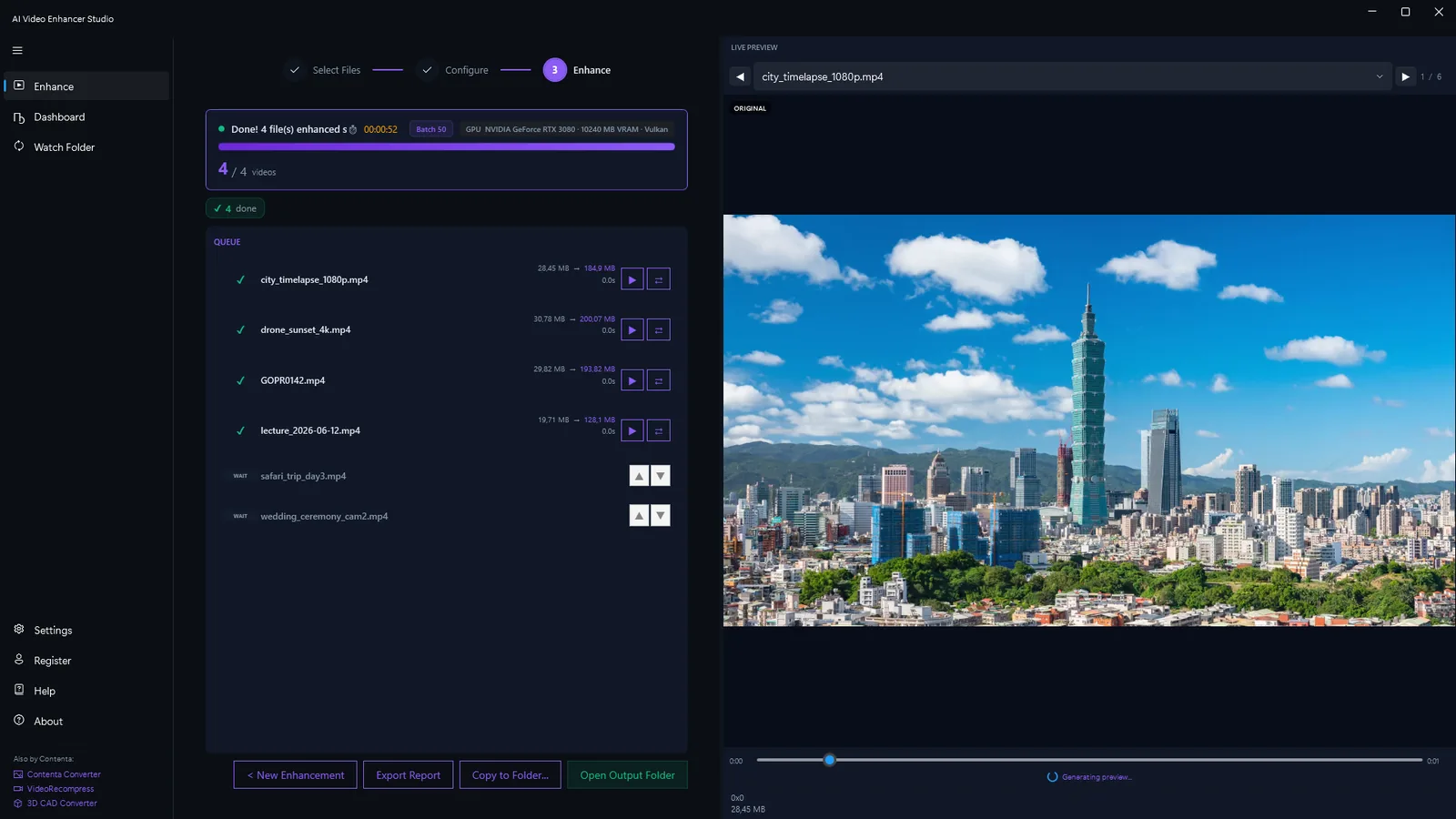
Built-In Workflows for Every Use Case
Pre-configured pipelines tuned for specific video types and industries.
Old Video Restoration
Restore VHS tapes, Hi8, MiniDV and old home videos. Denoising (hqdn3d or nlmeans) removes analog noise, upscaling sharpens soft footage, and RIFE frame interpolation smooths jerky playback.
Surveillance Enhancement
Enhance low-resolution security camera footage. AI upscaling reveals detail in faces, license plates, and objects. Denoise night-vision and low-light recordings.
Content Creation
Upscale and enhance YouTube, TikTok, and social media videos. Convert 1080p to 4K for professional quality. Remove compression artifacts from re-encoded content.
Drone & Action Camera
Stabilize shaky drone footage and GoPro clips. Denoise high-ISO low-light shots. Upscale to 4K for cinematic quality from compact cameras.
Animation & Anime
Upscale anime and animated content with models specifically trained for drawn artwork. Clean line art, preserve flat colors, and eliminate compression banding.
Video Archival
Prepare video archives for long-term storage. Upscale, denoise, and re-encode to modern codecs (H.265, AV1) for maximum quality at minimal file size.
Enhance (No Upscale)
Clean up compression artifacts and sharpen footage without changing the resolution. Perfect when the source is already HD and you just want it crisper and cleaner.
Smooth Motion (30fps)
Interpolate footage to a higher frame rate with RIFE for fluid, judder-free motion. Turn 30fps into smooth 60fps without touching resolution.
How AI Video Enhancer Studio Compares
See how we stack up against Topaz Video AI, HitPaw, and AVCLabs.
| Feature | Topaz Video AI ($299/yr) | HitPaw ($350 lifetime) | AVCLabs ($300 lifetime) | AI Video Enhancer |
|---|---|---|---|---|
| Upscaling (2x–4x) | ✔ | ✔ | ✔ | ✔ |
| Noise reduction | ✔ | Limited | Limited | ✔ |
| Frame interpolation | ✔ | ✘ | ✔ | ✔ |
| Stabilization | ✔ | ✘ | ✘ | ✔ |
| Batch processing | Limited | ✔ | ✔ | ✔ |
| HW encoding (NVENC) | ✘ | ✘ | ✘ | ✔ |
| Fully offline | ✔ | ✔ | ✔ | ✔ |
| GPU acceleration | ✔ | ✔ | ✔ | ✔ |
| Highlight-reel remix (scene + audio AI, 9:16 export) | ✘ | ✘ | ✘ | ✔ |
| Frame extraction (presets + AI upscale) | Limited | ✘ | ✘ | ✔ |
| Cost | $299/yr | $350 | $300 | One-time |
How It Works
Add Your Videos
Drop video files or entire folders. AI Video Enhancer Studio reads MP4, MKV, AVI, MOV, WebM, and 20+ more formats.
Choose Enhancement
Select upscaling, denoising, frame interpolation or stabilization, or combine several. Choose a preset workflow or configure your own.
Enhance
Hit Start. GPU-accelerated AI processes your videos locally. NVENC hardware encoding for fast output.
CLI & MCP Server
Automate AI video enhancement from scripts, CI/CD pipelines, or AI agents. CLI and MCP server included with every license.
CLI Commands
| Command | Description |
|---|---|
aivideoenhancer enhance | Enhance a video with denoising, stabilization, NVIDIA RTX VSR upscaling and RIFE frame interpolation |
aivideoenhancer analyze | Analyze a video file — resolution, codec, duration, bitrate, noise level assessment |
aivideoenhancer presets | List all 8 built-in enhancement presets with their AI pipeline configuration |
aivideoenhancer status | Check license, GPU availability, and AI model status |
aivideoenhancer serve | Start the MCP server for AI agent integration (stdio transport) |
aivideoenhancer remix | Suggest and render highlight-reel remixes — clips, aspect, music, audio weighting |
aivideoenhancer extract-frames | Extract still frames from a video or folder using presets, count, or timestamps, with optional AI upscale |
# AI upscale to 4x with GPU acceleration
aivideoenhancer enhance video.mp4 --upscale 4x --gpu auto

# Denoise and stabilize old footage
aivideoenhancer enhance old_tape.mp4 --denoise strong --stabilize

# Apply a built-in preset
aivideoenhancer enhance clip.mp4 --preset old_video_restoration

# Frame interpolation to 60fps
aivideoenhancer enhance video.mp4 --interpolate 60fps --json

# Analyze a video file
aivideoenhancer analyze video.mp4 --json

# Extract 10 evenly spaced frames, AI-upscaled 2x
aivideoenhancer extract-frames video.mp4 --output frames/ --count 10 --upscale x2

# Batch-extract a storyboard preset from every video in a folder
aivideoenhancer extract-frames videos/ --output frames/ --preset storyboard
MCP Server — AI Agent Integration
Run aivideoenhancer serve to start a Model Context Protocol server. AI agents like Claude can then analyze, enhance, and process videos through natural language.
| MCP Tool | Description |
|---|---|
analyze_video | Analyze a video — resolution, codec, duration, bitrate, noise level, and enhancement suggestions |
enhance_video | Enhance a video with denoising, stabilization, NVIDIA RTX VSR upscaling and RIFE interpolation options |
list_presets | List all 8 built-in presets with AI model and pipeline details |
get_status | Check GPU availability, AI model status, and license info |
// claude_desktop_config.json
{
  "mcpServers": {
    "aivideoenhancer": {
      "command": "aivideoenhancer",
      "args": ["serve"]
    }
  }
}
Claude Code Agent Skills
Install the video enhancement skill to let Claude Code use your CLI directly. Describe what you want — Claude knows all AI models, presets, and enhancement options.
# Install the skill
claude skill install github:brunojanvier77/ContentaSoft/skills/contenta-video-enhancer
Once installed, ask Claude: "Upscale all videos in D:\Old_Tapes to 4K and remove noise"
What Users Say
Restored my dad's wedding VHS to 1080p. The frame interpolation made old home movies look like they were filmed yesterday.
Anime upscaling rivals Topaz at half the price. One-time purchase instead of a $299/year subscription sealed it for me.
Cleaned up 200 hours of drone footage overnight on my RTX 4070. Batch mode actually works on consumer hardware.
Frequently Asked Questions
Yes. AI Video Enhancer Studio does upscaling (NVIDIA RTX VSR), AI frame interpolation (RIFE) and denoising for a one-time price instead of the $299/year Topaz subscription. Stabilization and batch processing are included.
NVIDIA RTX VSR for upscaling and RIFE for frame interpolation. Everything else is an FFmpeg filter: hqdn3d or nlmeans denoising, two-pass vidstab stabilization, yadif or bwdif deinterlacing, unsharp mask or CAS sharpening. It all runs locally on your machine — no cloud processing, no API calls.
Yes. Upscale 720p to 1440p (2x), 720p to 4K (4x), or 1080p to 4K (2x). Multiple AI models optimized for real-world footage, animation, and archival content.
AI Video Enhancer Studio will be a one-time purchase — no subscription. Sign up to be notified of pricing and early-bird discounts when we launch.
Yes. AI Video Enhancer Studio runs entirely on your computer. No cloud uploads, no internet required, no file size limits. Your videos stay private on your machine.
Yes. The Old Video Restoration workflow combines denoising (hqdn3d or nlmeans removes analog noise and tape artifacts), upscaling (sharpens soft SD footage to HD) and RIFE frame interpolation (smooths jerky 24fps playback).
AI upscaling uses NVIDIA RTX Video Super Resolution, so it requires an NVIDIA RTX GPU (20-series or newer) with a current driver - there is no CPU, AMD, or Intel fallback for upscaling. Every other enhancement (denoise, sharpen, stabilize, deinterlace) and hardware encoding work on any modern Windows PC.
H.264, H.265 (HEVC), AV1, and VP9. Hardware-accelerated encoding via NVENC (NVIDIA), AMF (AMD), or QSV (Intel) for fast output. Configurable quality, bitrate, and container format.
Yes. Batch-process entire folders of video files and chain several enhancements in one pipeline. Multi-file queue with progress tracking and automatic output organization.
Start Enhancing Your Videos Today
Download the free trial or buy a license. No subscription, no cloud required.