Keep the RTX VSR upscale: save it to a new video file
VLC, Chrome and PotPlayer apply RTX Video Super Resolution only while the video plays. AI Video Enhancer Studio runs the same NVIDIA VSR on your RTX card and writes the result to a new MP4 you can keep, copy and share.
Needs an NVIDIA RTX graphics card, 20-series or newer. Windows 10 and 11.Download Free Trial Buy for $129
Free trial: your first 5 files within 30 days, at full resolution and without a watermark. After that, a watermark and a 720p cap until you buy. $129 once, no subscription.
Playback upscaling vs. a saved file
A player upscales frames for your monitor and then discards them, so a copy on a USB stick, a TV or an upload stays at the old resolution. A saved file keeps the upscale everywhere.
Real output: 540p in, 1080p out
 Source 540p
 RTX VSR 2×
Source: a 6-second 960×540 H.264 copy of a licensed stock clip. Output from AI Video Enhancer Studio 2026.7.12. The source crop is enlarged with bicubic scaling, as a player would show it, so both crops appear at the same size.
Three steps in AI Video Enhancer Studio
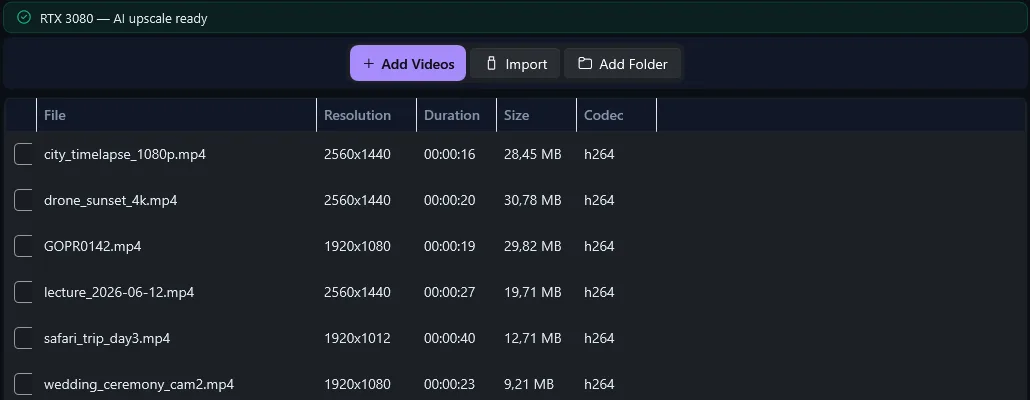
Click Add Videos or Add Folder. The list shows each file's resolution, length and codec.
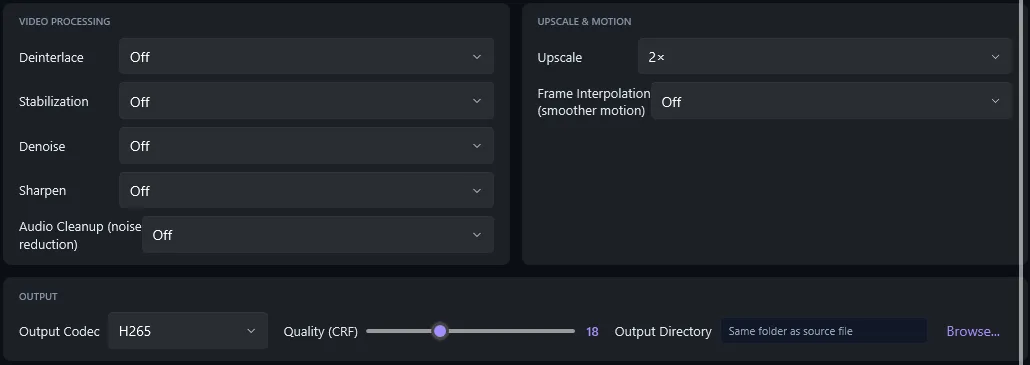
On Configure, pick the scale and the output codec. The summary shows the GPU path: NVIDIA VSR.
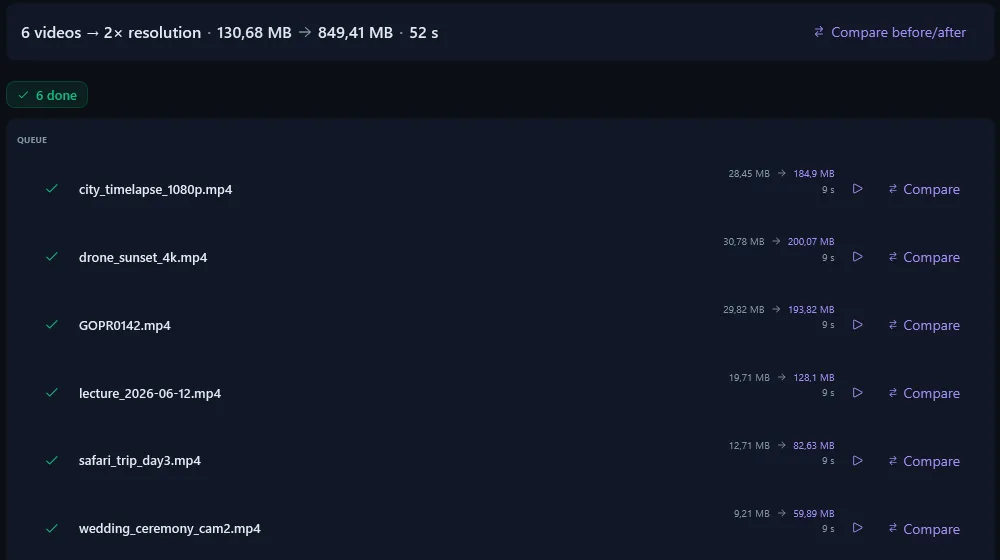
Click Start Enhancement. Every video gets a new file, next to the original or in the folder you chose.
What RTX VSR is, and which cards run it
RTX Video Super Resolution is NVIDIA's neural network for upscaling video. It runs on the Tensor Cores that only RTX cards have.
| Graphics card | RTX VSR upscaling | Deinterlace, denoise, stabilization, RIFE |
|---|---|---|
| NVIDIA GeForce RTX 20, 30, 40 and 50 series (desktop and laptop) | ✓ Yes | ✓ Yes |
| NVIDIA GTX 16 and 10 series | ✗ No | ✓ Yes |
| AMD Radeon, Intel Arc, integrated graphics | ✗ No | ✓ Yes |
Without an RTX card, the app names your card and switches Upscale off; the other filters still run. Keep the NVIDIA driver up to date.
Upscale a whole folder
Add Folder queues every video in a folder. Watch Folder picks up new files as they arrive. For scripts, the same job runs from the command line:
aivideoenhancer enhance "D:\Videos\Old" --upscale x2 --codec h265 -o "D:\Videos\Upscaled"
Scale, quality and output formats
| Setting | Choices | What it changes |
|---|---|---|
| Upscale | Enhance (same size), 2×, 3×, 4× | Output resolution. 2× turns 1080p into 4K. |
| VSR quality | High | Used for every file. The quality slider in the NVIDIA App only affects playback. |
| Output Codec | H.264, H.265, AV1, VP9, ProRes, DNxHR | Compatibility and file size. H.265 is the default. |
| Quality (CRF) | 1 to 51, default 18 | Lower numbers keep more detail and make larger files. |
| Encoder | NVENC, Quick Sync, AMF or software | Speed only. The app picks the hardware encoder your PC has. |
Free trial: your first 5 files within 30 days, at full resolution and without a watermark. After that, a watermark and a 720p cap until you buy. $129 once, no subscription.
Questions about RTX VSR and saved files
Does RTX VSR upscaling work on AMD or Intel graphics?
No. RTX Video Super Resolution runs only on NVIDIA RTX cards, 20-series or newer. On AMD, Intel or GTX cards, Upscale is switched off and the other filters still work. The free trial shows on your own PC whether your card qualifies.
Will the upscaled file be bigger?
Yes. Four times the pixels need more data: our 6-second 540p test clip went from 0.5 MB to 10.9 MB as 1080p H.264 at the default quality. H.265 or AV1, or a higher CRF number, gives smaller files.
Can it upscale 1080p to 4K?
Yes. Upscale 2× turns 1920×1080 into 3840×2160. VSR sharpens edges and removes compression blocks; it does not add detail the camera never recorded. The Configure step shows a time estimate before you start.
How is this different from the Super Resolution setting in VLC or Chrome?
It is the same NVIDIA engine. VLC and Chrome show the upscale on your screen while the video plays and keep nothing. AI Video Enhancer Studio writes every upscaled frame into a new video file.
What does the free trial include?
Your first 5 files within 30 days, at full resolution and without a watermark. After that, output carries a watermark and is capped at 720p until you buy a license ($129, one time).
Related
Every upscaling option, with a price table against Topaz, Video2X and Upscayl.
Hardware, price and setup of three upscalers side by side.
$129 once instead of $299 a year.
Deinterlace old discs and tapes first, then upscale.
Needs an NVIDIA RTX graphics card, 20-series or newer. Windows 10 and 11.
Published by ContentaSoft, Umea, Sweden — developer of AI Video Enhancer Studio.
AI Video Enhancer Studio is a desktop application for Windows that upscales video with NVIDIA RTX Video Super Resolution, interpolates frames with RIFE, and denoises, stabilizes and deinterlaces with FFmpeg filters. Encoding is GPU-accelerated.
This software contains no adware, spyware, toolbars, or bundled third-party programs. The installer installs only AI Video Enhancer Studio.
Videos are processed on your own PC, on its processor and graphics card. The software sends anonymous install, crash and usage statistics and license checks, as described in the Privacy Policy.
Free trial: your first 5 files within 30 days at full resolution without a watermark. After that, output is watermarked and capped at 720p until you enter a license key. Lifetime license: $129 (one-time payment, no subscription).
How to Uninstall
Open Windows Settings > Apps > Installed apps, find "AI Video Enhancer Studio" in the list, and click Uninstall. You can also run the uninstaller from the installation folder or use Control Panel > Programs and Features.
Download size: ~2 MB (web installer). Additional components including AI models are downloaded during installation.