File format guide
IGES (.igs) file: open it, convert it to STEP or STL
IGES is the older neutral CAD format: first published in 1980, last revised in 1996. Most IGES files carry surfaces rather than solids, so they look fine in a viewer but can import as loose faces or print as a leaky shell. Here is what that looks like in numbers, and how to fix it on the way to STEP or STL.
IGES vs STEP at a glance
| What matters | IGES (.igs, .iges) | STEP (.stp, .step) |
|---|---|---|
| Standard | US (ANSI), last revised 1996 (5.3) | ISO 10303, still developed (AP242) |
| Usual content | Trimmed surfaces and curves | Closed solids |
| Assembly tree | No real tree | Yes, with part names |
| Use today | Legacy data, tooling, some CAM | Default for CAD exchange |
When you can choose, send STEP. When a customer or an old system sends IGES, convert it.
Why an IGES file opens as loose surfaces
IGES file
54separate facesto STEP
54open shellsto STEP + Repair
1closed shellReal run: a Creo housing (54 faces) saved as IGES, then converted back to STEP by 3D CAD Converter 1.0.22. The size stayed 27 × 19 × 27 mm both ways; Repair geometry sewed the 54 faces into one closed shell.
Convert IGES to STEP or STL
- Add the .igs filesOne file or a folder; .igs and .iges both work.
- Pick STEP or STLSTEP for CAD, STL for printing, glTF for the web.
- Tick Repair geometrySews the faces together. On the housing above, 54 faces became one closed shell.
- ConvertSame settings for every file in the batch.
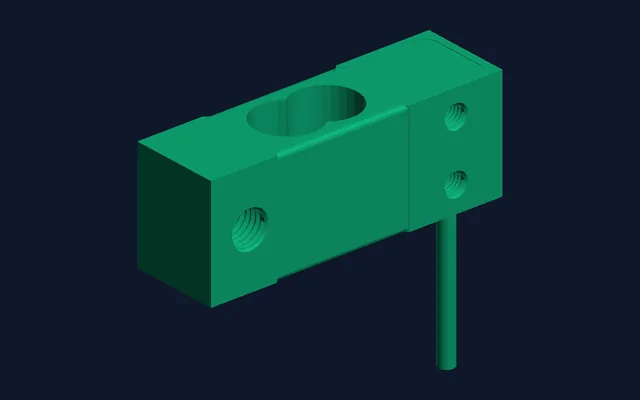
Real output: a 2.5 MB IGES load cell. The STL made straight from the IGES and the one made from the new STEP match: same triangle count, same 75 × 22.5 × 68 mm size. Ryzen 9 3900X.
cadconvert convert -i housing.igs -o housing.step --repair
cadconvert convert -i part.igs -o part.stl --tessellation 0.01 --angular 0.1 --repair
From the command line, --repair turns on the same sewing.
IGES pitfalls
Surfaces, not a solid
Most IGES exports carry faces only. Repair geometry sews them into a shell; true solids come from STEP.
Gaps along the edges
Small gaps between faces make a non-manifold STL. Repair geometry sews small gaps; wide ones need a fix in the source CAD file. How repair works
Wrong size after import
IGES stores its unit in the header. If a part arrives 25.4x too big or too small, the unit was lost on the way: convert again with Convert units set from inch to mm, or back.
STL to IGES
Not possible here: a mesh cannot become exact surfaces again.
To only look at an IGES file, CAD Assistant and FreeCAD from our STEP guide open it too. The STEP guide
Convert your IGES files to STEP or STLFree trial: 10 conversions, no credit card. Windows 10/11, 64-bit.
Download Free TrialIGES file questions
Is .igs the same as .iges?
Yes. Both extensions hold the same IGES format.
Should I send IGES or STEP?
STEP, unless the receiver asks for IGES. STEP keeps solids and assemblies; IGES often arrives as loose faces.
Can I convert IGES to STEP for free?
FreeCAD can, one file at a time. The 3D CAD Converter trial gives you 10 conversions, batch and Repair geometry included.
Can I convert STL to IGES or STEP?
Not with 3D CAD Converter: a mesh has no exact surfaces to write. Go back to the CAD file the STL came from.
Related: IGES format reference · STEP vs IGES · What a STEP file is · STEP to STL at four settings