DVD and VHS to 1080p: deinterlace, denoise, then upscale
Short answer: DVD video and VHS captures are interlaced. Remove the interlacing first (Deinterlace: Yadif), take the tape noise down (Denoise: Light), and only then upscale 2× with NVIDIA RTX Video Super Resolution. Upscale first and the comb lines get sharpened along with the picture.
The order that works
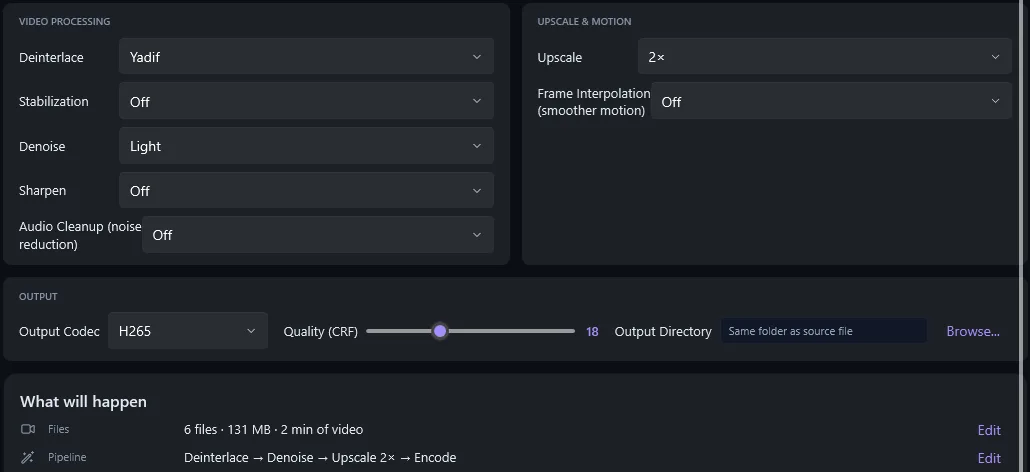
Why interlacing ruins an upscale
An interlaced frame holds two half-pictures (fields) taken 1/50 or 1/60 of a second apart, woven line by line. On anything that moves, the two fields disagree and edges turn into combs. An upscaler cannot tell a comb from real detail, so it makes the teeth bigger and sharper.
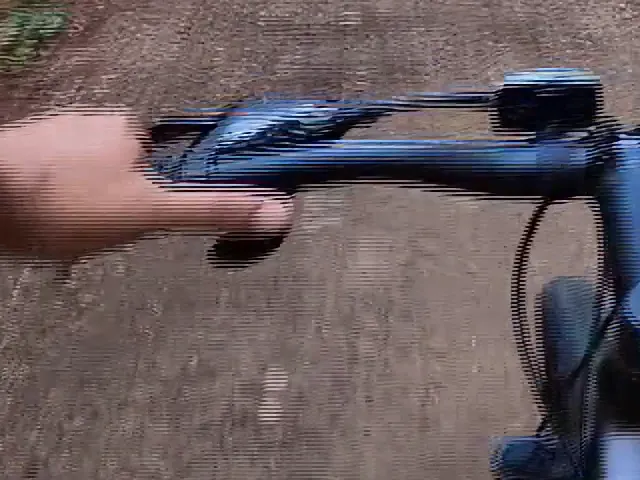 Upscaled, no deinterlace
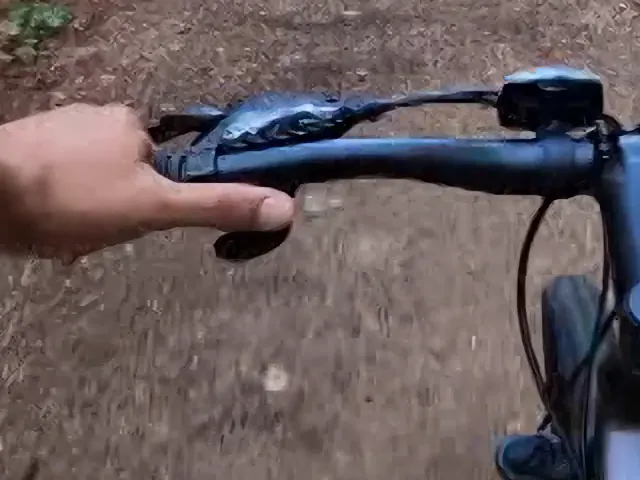 Yadif + denoise, then upscale
Settings in AI Video Enhancer Studio
- Click Add Videos or Add Folder and load the VOB or MPG files from the disc, or your capture files (AVI, DV, MP4).
- Click Auto-Analyze. It reports which files are interlaced.
- Set Deinterlace to Yadif. Pick Yadif (Bob) instead for smoother motion at 50 or 60 frames per second.
- Set Denoise to Light (Medium for a noisy tape) and Upscale to 2×.
- Choose H.265 as Output Codec and click Start Enhancement.
Starting settings per source
| Source | Frame | Deinterlace | Denoise | Upscale 2× gives |
|---|---|---|---|---|
| DVD (NTSC) | 720×480, 29.97i | Yadif | Light | 1440×960 |
| DVD (PAL) | 720×576, 25i | Yadif | Light | 1440×1152 |
| VHS or Hi8 capture | 720×480 / 720×576 | Yadif | Medium | 1440×960 / 1440×1152 |
| DV / MiniDV | 720×480 / 720×576 | Yadif | Off or Light | 1440×960 / 1440×1152 |
2× lands at 960 lines from NTSC and 1,152 from PAL, the 1080p class; your TV or player scales the last step. 3× (1,440 or 1,728 lines) only makes sense for a 4K screen and takes longer.
Check the 4:3 shape
Most camcorder DVDs and all VHS tapes are 4:3, and DVD pixels are not square: a 720×480 frame is shown as 4:3. The upscaled file does not keep that 4:3 flag yet. An NTSC file (1440×960) plays too wide and a PAL file (1440×1152) too narrow, so set your player's aspect ratio to 4:3. A round wheel must look round.
What the filters can and cannot fix
Fixes
- Comb lines from interlacing (Deinterlace)
- Grain, tape noise and MPEG blocks (Denoise)
- Soft edges, at twice the lines (NVIDIA VSR)
- Shaky handheld shots (Stabilization)
Stays as it is
- Faces or text only a few pixels wide
- Tracking lines, dropouts and tape creases
- Colour smearing next to edges
- Detail that was never on the tape
Related guides
- VHS tape restoration
- Deinterlacing
- Video Deinterlacing: The End of Combing Artifacts
- How to Restore Old Home Movies with AI
- Save RTX VSR to a file
Questions
Can I upscale a DVD straight to 4K?
You can pick 3× or 4×, but a DVD holds 480 or 576 lines. 2× already shows what the disc contains; more only makes a bigger file that your TV would have scaled anyway.
Do I need an NVIDIA graphics card?
For the upscale, yes: NVIDIA RTX Video Super Resolution needs an RTX card, 20-series or newer. Deinterlace and Denoise run on any Windows 10 or 11 PC.
Yadif or Yadif (Bob)?
Yadif keeps the frame rate (25 or 29.97 frames per second). Yadif (Bob) makes a frame from every field (50 or 59.94): smoother motion, bigger file. Both remove the combs.
Can the app copy the DVD?
No. Copy the VOB files from an unprotected disc, or use your ripping tool, then load them. Tapes need a capture device first.
Try it on your own discs and tapes
Load a VOB or a capture file, set Deinterlace, Denoise and Upscale, and compare the result with the original.
Download Free TrialFree trial: your first 5 files within 30 days at full resolution. Upscaling needs an NVIDIA RTX card.